Building an EnterpriseGrade Zero Trust Azure Landing Zone (2026 Standards)
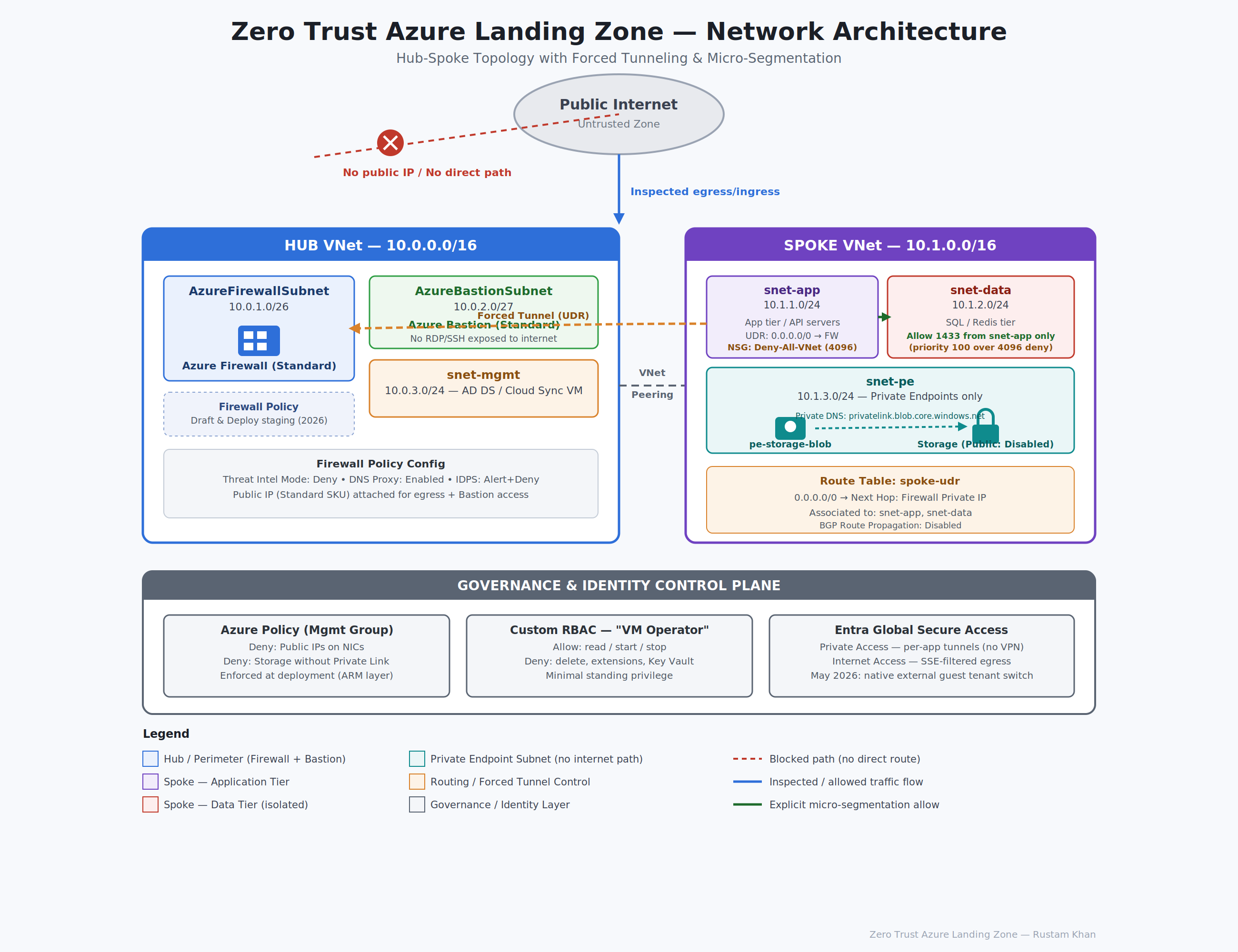
This isn’t a conceptual overview. Every phase has exact configurations, JSON snippets, and the red team rationale behind each decision.
Prerequisites
Before phase 1, make sure the following are in place:
- An active Azure subscription with Owner or Contributor + User Access Administrator rights
- Azure CLI installed and authenticated (
az login) - A Management Group hierarchy configured (Root MG → Prod MG → Subscription) Azure Policy in Phase 5 targets the MG level
- Resource Group:
zt-landing-zone-rgin your preferred region (used throughout as the lab container)
az group create --name zt-landing-zone-rg --location eastus2
Phase 1: Hub VNet & The Central Chokepoint
The hub is the nerve center. Every byte of traffic north-south internet egress, east-west spoke-to-spoke passes through here. Nothing transits the network without first hitting the firewall. This is the architectural primitive that makes everything else enforceable.
The Network Layout
Create the Hub VNet and its subnets:
# Hub VNet
az network vnet create \
  --resource-group zt-landing-zone-rg \
  --name hub-vnet \
  --address-prefix 10.0.0.0/16

# Azure Firewall requires exactly this subnet name
az network vnet subnet create \
  --resource-group zt-landing-zone-rg \
  --vnet-name hub-vnet \
  --name AzureFirewallSubnet \
  --address-prefix 10.0.1.0/26

# Azure Bastion requires exactly this subnet name
az network vnet subnet create \
  --resource-group zt-landing-zone-rg \
  --vnet-name hub-vnet \
  --name AzureBastionSubnet \
  --address-prefix 10.0.2.0/27

az network vnet subnet create \
  --resource-group zt-landing-zone-rg \
  --vnet-name hub-vnet \
  --name snet-mgmt \
  --address-prefix 10.0.3.0/24
Deploying Azure Firewall Standard
Provision the public IP and the Firewall itself:
# Public IP for firewall egress
az network public-ip create \
  --resource-group zt-landing-zone-rg \
  --name fw-pip \
  --sku Standard \
  --allocation-method Static

# Deploy Firewall (Standard SKU)
az network firewall create \
  --resource-group zt-landing-zone-rg \
  --name hub-azfw \
  --sku-name AZFW_VNet \
  --sku-tier Standard \
  --vnet-name hub-vnet \
  --public-ip-name fw-pip
Store the Firewall’s private IP you’ll need it for the UDR in Phase 2:
FW_PRIVATE_IP=$(az network firewall show \
  --resource-group zt-landing-zone-rg \
  --name hub-azfw \
  --query "ipConfigurations[0].privateIPAddress" \
  --output tsv)

echo "Firewall Private IP: $FW_PRIVATE_IP"
Draft & Deploy for Firewall Policies
This is operationally significant. Prior to March 2026, every application or network rule change applied immediately to the live policy and carried a 2–4 minute propagation window during which traffic could be dropped. In production environments with tight SLAs, this was a deployment scheduling nightmare.
The Draft & Deploy feature (GA: March 2026) fixes this by introducing a staging layer inside Firewall Policy:
- Navigate to your Firewall Policy → Draft blade
- Clone the active policy into a Draft
- Make all rule additions, modifications, and deletions inside the Draft
- Validate against the policy’s rule collection groups
- Bulk deploy the finalized Draft the swap is atomic, minimizing disruption to seconds rather than minutes per rule
Why this matters from a security posture standpoint: The old workflow incentivized batching fewer, larger rule changes to minimize maintenance windows, which often meant rules stayed looser longer than intended. Draft & Deploy removes that friction you can iterate rapidly on deny rules and tighten the policy continuously.
Create and link the Firewall Policy:
az network firewall policy create \
  --resource-group zt-landing-zone-rg \
  --name hub-fw-policy \
  --sku Standard \
  --threat-intel-mode Deny

az network firewall update \
  --resource-group zt-landing-zone-rg \
  --name hub-azfw \
  --firewall-policy hub-fw-policy
Key policy configurations:
- Threat Intelligence Mode:
DenynotAlert. Alert is a logging exercise. Deny actively blocks known malicious IPs and domains at the firewall level, which matters when a compromised VM tries to beacon out to a known C2. - DNS Proxy: Enable it. Route all spoke DNS through the Firewall so you have full DNS query visibility in Firewall logs.
- IDPS: Enable in
Alert and Denymode (requires Premium SKU if you want TLS inspection — plan for this in regulated workloads).
Deploying Azure Bastion
Bastion eliminates the need for any VM to have a public IP. There are no exposed RDP/SSH ports ever. A red teamer who compromises credentials still can’t directly reach a VM from the internet.
az network bastion create \
  --resource-group zt-landing-zone-rg \
  --name hub-bastion \
  --vnet-name hub-vnet \
  --public-ip-address fw-pip \
  --location eastus2 \
  --sku Standard
Use Standard SKU it enables IP-based connection, tunneling, and shareable links, all of which you’ll want in an enterprise context.
Phase 2: Spoke VNet & Forced Tunneling
The spoke hosts the actual workloads app tier, data tier, private endpoints. On its own, a spoke VNet is just an isolated network. The moment you peer it to the hub and drop a UDR on its subnets, every egress packet is rerouted through the firewall before it leaves. That’s the chokepoint enforced at the routing layer, not just the policy layer.
Spoke Network Layout
Spoke VNet: 10.1.0.0/16
├── snet-app    10.1.1.0/24  (application tier — web servers, APIs)
├── snet-data   10.1.2.0/24  (data tier — SQL, Redis)
└── snet-pe     10.1.3.0/24  (private endpoints only — no VMs)
az network vnet create \
  --resource-group zt-landing-zone-rg \
  --name spoke-vnet \
  --address-prefix 10.1.0.0/16

az network vnet subnet create \
  --resource-group zt-landing-zone-rg \
  --vnet-name spoke-vnet \
  --name snet-app \
  --address-prefix 10.1.1.0/24

az network vnet subnet create \
  --resource-group zt-landing-zone-rg \
  --vnet-name spoke-vnet \
  --name snet-data \
  --address-prefix 10.1.2.0/24

az network vnet subnet create \
  --resource-group zt-landing-zone-rg \
  --vnet-name spoke-vnet \
  --name snet-pe \
  --address-prefix 10.1.3.0/24 \
  --disable-private-endpoint-network-policies true
The --disable-private-endpoint-network-policies flag on snet-pe is required Azure won’t let you inject a private endpoint into a subnet that has these policies enforced.
«“Azure Portal showing spoke-vnet subnets blade with all three subnets (snet-app, snet-data, snet-pe) listed with their address ranges and their NSG association column (empty at this stage)"»
VNet Peering Hub ↔ Spoke
Peering must be created in both directions. Note the flags: --allow-forwarded-traffic lets the firewall forward traffic on behalf of spokes, and --use-remote-gateways / --allow-gateway-transit wire up any future VPN/ExpressRoute gateway in the hub.
# Hub → Spoke
az network vnet peering create \
  --resource-group zt-landing-zone-rg \
  --name hub-to-spoke \
  --vnet-name hub-vnet \
  --remote-vnet spoke-vnet \
  --allow-vnet-access \
  --allow-forwarded-traffic \
  --allow-gateway-transit

# Spoke → Hub
az network vnet peering create \
  --resource-group zt-landing-zone-rg \
  --name spoke-to-hub \
  --vnet-name spoke-vnet \
  --remote-vnet hub-vnet \
  --allow-vnet-access \
  --allow-forwarded-traffic \
  --use-remote-gateways false
The UDR: Forcing Everything Through the Firewall
This is the most important single configuration in the entire architecture from a red team perspective. Without the UDR, a compromised VM in the spoke can route directly to the internet no inspection, no logging, no blocking. The UDR removes that option entirely by overriding the default Azure system route and redirecting 0.0.0.0/0 to the firewall’s private IP.
# Create Route Table
az network route-table create \
  --resource-group zt-landing-zone-rg \
  --name spoke-udr \
  --disable-bgp-route-propagation true

# Force all internet-bound traffic through Firewall
az network route-table route create \
  --resource-group zt-landing-zone-rg \
  --route-table-name spoke-udr \
  --name force-tunnel-to-fw \
  --address-prefix 0.0.0.0/0 \
  --next-hop-type VirtualAppliance \
  --next-hop-ip-address $FW_PRIVATE_IP

# Associate with both workload subnets
az network vnet subnet update \
  --resource-group zt-landing-zone-rg \
  --vnet-name spoke-vnet \
  --name snet-app \
  --route-table spoke-udr

az network vnet subnet update \
  --resource-group zt-landing-zone-rg \
  --vnet-name spoke-vnet \
  --name snet-data \
  --route-table spoke-udr
--disable-bgp-route-propagation true prevents on-prem routes learned via BGP from overriding your forced tunnel a subtle but important flag in hybrid environments where an attacker-controlled on-prem route could potentially be injected.
Phase 3: Micro-Segmentation & Identity Guardrails
VNet peering with a UDR gets you network-level chokepoint enforcement. But once traffic is inside the VNet, you need a second control layer that enforces tier-to-tier isolation. NSGs provide that at the subnet level. Then, above the network layer entirely, RBAC defines what authenticated identities can actually do to resources even if they land inside the network.
NSG: Tiered Micro-Segmentation
The default NSG behavior in Azure includes rule 65000 (AllowVnetInBound) which allows all traffic between all subnets in the same VNet and peered VNets. In a Zero Trust posture, that rule is unacceptable. You override it by inserting a lower-numbered (higher-priority) Deny-All-VNet rule, then explicitly punch holes only for known-good traffic flows.
NSG for snet-data (SQL tier):
az network nsg create \
  --resource-group zt-landing-zone-rg \
  --name nsg-snet-data

# Deny all VNet-internal traffic first (overrides default 65000 allow)
az network nsg rule create \
  --resource-group zt-landing-zone-rg \
  --nsg-name nsg-snet-data \
  --name Deny-All-VNet-Inbound \
  --priority 4096 \
  --direction Inbound \
  --access Deny \
  --protocol "*" \
  --source-address-prefixes VirtualNetwork \
  --source-port-ranges "*" \
  --destination-address-prefixes "*" \
  --destination-port-ranges "*"

# Explicitly allow SQL (1433) from App tier only
az network nsg rule create \
  --resource-group zt-landing-zone-rg \
  --nsg-name nsg-snet-data \
  --name Allow-SQL-from-App \
  --priority 100 \
  --direction Inbound \
  --access Allow \
  --protocol Tcp \
  --source-address-prefixes 10.1.1.0/24 \
  --source-port-ranges "*" \
  --destination-address-prefixes 10.1.2.0/24 \
  --destination-port-ranges 1433

# Attach NSG to data subnet
az network vnet subnet update \
  --resource-group zt-landing-zone-rg \
  --vnet-name spoke-vnet \
  --name snet-data \
  --network-security-group nsg-snet-data
Priority logic explained:
| Priority | Rule | Effect |
|---|---|---|
| 100 | Allow-SQL-from-App | SQL (1433) from snet-app → snet-data allowed |
| 4096 | Deny-All-VNet-Inbound | All other VNet traffic blocked |
| 65000 | (Default) AllowVnetInBound | Never reached — overridden by 4096 |
| 65500 | (Default) DenyAllInBound | All other inbound blocked |
Red team implication: A compromised API server in snet-app can reach snet-data:1433 but nothing else. It can’t pivot to Redis, SMB, RPC, or any other service. It cannot move laterally into snet-pe. The lateral movement surface is precisely one protocol to one subnet.
Custom RBAC: VM Operator Role
The principle here is minimal standing privilege. A developer who needs to restart VMs should not also have the ability to delete them or touch Key Vault secrets. Azure’s built-in Virtual Machine Contributor role grants delete and write on extensions both useful to an attacker with stolen credentials.
This custom role strips it down to exactly what’s needed:
{
  "Name": "VM Operator",
  "IsCustom": true,
  "Description": "Can read, start, and stop VMs. Cannot delete, redeploy, or access Key Vault.",
  "Actions": [
    "Microsoft.Compute/virtualMachines/read",
    "Microsoft.Compute/virtualMachines/start/action",
    "Microsoft.Compute/virtualMachines/powerOff/action",
    "Microsoft.Compute/virtualMachines/restart/action",
    "Microsoft.Compute/virtualMachines/instanceView/read",
    "Microsoft.Network/networkInterfaces/read",
    "Microsoft.Resources/subscriptions/resourceGroups/read"
  ],
  "NotActions": [
    "Microsoft.Compute/virtualMachines/delete",
    "Microsoft.Compute/virtualMachines/redeploy/action",
    "Microsoft.Compute/virtualMachines/extensions/*",
    "Microsoft.KeyVault/*"
  ],
  "DataActions": [],
  "NotDataActions": [],
  "AssignableScopes": [
    "/subscriptions/<your-subscription-id>"
  ]
}
Deploy it:
az role definition create --role-definition @vm-operator-role.json

# Assign to a user or group
az role assignment create \
  --assignee "<user-or-group-object-id>" \
  --role "VM Operator" \
  --scope "/subscriptions/<your-subscription-id>/resourceGroups/zt-landing-zone-rg"
Key omissions in NotActions:
Microsoft.Compute/virtualMachines/extensions/*blocks script execution via Custom Script Extension, which is a common post-compromise persistence techniqueMicrosoft.KeyVault/*credential access is completely out of scope for this roledeleteremoves the ability to disrupt infrastructure or cover tracks
Hybrid Identity: Entra Cloud Sync
For organizations running Active Directory Domain Services (AD DS) on-premises, Entra Cloud Sync provides the lightweight synchronization bridge. Unlike the full Entra Connect agent, Cloud Sync runs as a lightweight provisioning agent (AADConnectProvisioningAgent) deployed on any AD DS member server it requires no dedicated sync server, supports multi-forest topologies natively, and communicates outbound-only over HTTPS/443 with no inbound firewall rules needed.
In this architecture, deploy the provisioning agent on the AD DS VM in snet-mgmt, configure it from the Entra ID portal under Entra ID → Hybrid Management → Microsoft Entra Cloud Sync, and point it at your on-prem forest. Synced accounts inherit Conditional Access policies and are eligible for Privileged Identity Management (PIM) critical for ensuring on-prem identities don’t bypass cloud-only controls.
Phase 4: Eliminating the Public Attack Surface
A storage account with a public endpoint is a breach waiting to happen. Even with strong authentication in place, a misconfigured SAS token, a leaked access key, or a confused deputy issue can expose data directly to the internet. The answer is simple: remove the public endpoint entirely, inject a private one into your controlled subnet, and route all traffic over the Microsoft backbone. No internet path = no exfiltration path.
Deploying the Hardened Storage Account
az storage account create \
  --resource-group zt-landing-zone-rg \
  --name ztlzstorageacct \
  --sku Standard_LRS \
  --kind StorageV2 \
  --allow-blob-public-access false \
  --public-network-access Disabled \
  --min-tls-version TLS1_2 \
  --https-only true
--public-network-access Disabled is the critical flag. This kills the public endpoint at the resource level not just via firewall rules that could be accidentally removed. Even the Azure Portal UI will show access as blocked unless you’re coming from an approved private endpoint.
Injecting the Private Endpoint
# Get Storage Account resource ID
STORAGE_ID=$(az storage account show \
  --resource-group zt-landing-zone-rg \
  --name ztlzstorageacct \
  --query id --output tsv)

# Create Private Endpoint in snet-pe
az network private-endpoint create \
  --resource-group zt-landing-zone-rg \
  --name pe-storage-blob \
  --vnet-name spoke-vnet \
  --subnet snet-pe \
  --private-connection-resource-id $STORAGE_ID \
  --group-id blob \
  --connection-name pe-storage-conn
Without a Private DNS Zone, the storage FQDN (ztlzstorageacct.blob.core.windows.net) still resolves to the public IP defeating the purpose. Create the zone and link it:
# Create the Private DNS Zone
az network private-dns zone create \
  --resource-group zt-landing-zone-rg \
  --name "privatelink.blob.core.windows.net"

# Link the DNS Zone to the Spoke VNet
az network private-dns link vnet create \
  --resource-group zt-landing-zone-rg \
  --zone-name "privatelink.blob.core.windows.net" \
  --name spoke-dns-link \
  --virtual-network spoke-vnet \
  --registration-enabled false

# Register the Private Endpoint's NIC in the DNS Zone
az network private-endpoint dns-zone-group create \
  --resource-group zt-landing-zone-rg \
  --endpoint-name pe-storage-blob \
  --name storage-dns-zone-group \
  --private-dns-zone "privatelink.blob.core.windows.net" \
  --zone-name "privatelink.blob.core.windows.net"
What this achieves: Any VM inside the spoke VNet that resolves ztlzstorageacct.blob.core.windows.net gets back a private IP (10.1.3.x) traffic goes through the private endpoint NIC inside snet-pe, over the Microsoft backbone, never hitting the public internet. An attacker exfiltrating data from a compromised external machine can’t even reach the storage endpoint to try.
Authenticating to Storage App Registration (Client Credentials)
Workloads that need storage access should authenticate via Entra ID, not storage keys. Here’s how:
Option A App Registration with Client Credentials:
# Create App Registration
APP_ID=$(az ad app create --display-name "zt-storage-app" --query appId -o tsv)

# Create Service Principal
az ad sp create --id $APP_ID

# Assign Storage Blob Data Reader to the storage account scope
az role assignment create \
  --assignee $APP_ID \
  --role "Storage Blob Data Reader" \
  --scope $STORAGE_ID
The application then authenticates to get a token:
import requests

tenant_id = "<your-tenant-id>"
client_id = "<app-id>"
client_secret = "<secret>"

token_response = requests.post(
    f"https://login.microsoftonline.com/{tenant_id}/oauth2/v2.0/token",
    data={
        "grant_type": "client_credentials",
        "client_id": client_id,
        "client_secret": client_secret,
        "scope": "https://storage.azure.com/.default"
    }
)

token = token_response.json()["access_token"]
Option B System-Assigned Managed Identity (preferred):
No credentials stored anywhere. The VM’s identity is managed entirely by Azure.
# Enable Managed Identity on a VM
az vm identity assign \
  --resource-group zt-landing-zone-rg \
  --name <vm-name>

# Assign Storage Blob Data Contributor role to the MI
az role assignment create \
  --assignee "<managed-identity-principal-id>" \
  --role "Storage Blob Data Contributor" \
  --scope $STORAGE_ID
From inside the VM, the token is fetched via IMDS (no credentials in code):
import requests

# IMDS endpoint — only accessible from within the VM
response = requests.get(
    "http://169.254.169.254/metadata/identity/oauth2/token",
    headers={"Metadata": "true"},
    params={
        "api-version": "2021-02-01",
        "resource": "https://storage.azure.com/"
    }
)

token = response.json()["access_token"]
Phase 5: Automated Governance & The Modern Perimeter
Manual configuration doesn’t scale and doesn’t hold. Engineers create resources, click through wizards, and inevitably leave public IPs or open storage accounts behind. Azure Policy moves enforcement from “best effort” to “enforced at deployment” resources that violate policy never reach a provisioned state. Global Secure Access then extends the Zero Trust perimeter to the edge: SaaS apps, internet destinations, and private resources accessed by remote users and guest collaborators.
Azure Policy: Preventive Controls at Scale
Deploy policies at the Management Group level so they inherit down to all child subscriptions automatically. The most impactful single policy in a Zero Trust posture:
Deny public IPs on any network interface:
# Get built-in policy definition ID
POLICY_ID=$(az policy definition list \
  --query "[?displayName=='Network interfaces should not have public IPs'].name" \
  -o tsv)

# Assign at Management Group scope with Deny effect
az policy assignment create \
  --name "deny-public-ips" \
  --display-name "Deny - Public IPs on NICs" \
  --policy $POLICY_ID \
  --scope "/providers/Microsoft.Management/managementGroups/<your-mg-id>" \
  --enforcement-mode Default \
  --params '{"effect": {"value": "Deny"}}'
Additional recommended policies at the same scope:
| Policy | Effect | Rationale |
|---|---|---|
| Require secure transfer to storage accounts | Deny | Blocks HTTP access to storage |
| Storage accounts should use private link | Audit/Deny | Flags public-endpoint storage |
| Only approved VM SKUs allowed | Deny | Prevents costly/risky VM types |
| Allowed locations | Deny | Constrains data residency to approved regions |
| Key Vault should have soft delete enabled | Deny | Prevents irreversible secret destruction |
Use Policy Initiatives (policy sets) to group related controls. Microsoft’s Azure Security Benchmark initiative is a reasonable starting baseline assign it in Audit mode first to assess your current gap, then tighten individual policies to Deny as remediation work completes.
Microsoft Entra Global Secure Access (SSE)
Global Secure Access is Microsoft’s Security Service Edge offering, and it’s where the “modern perimeter” label actually earns its weight. It splits into two profiles:
Internet Access Profile routes internet-bound traffic from enrolled devices through Microsoft’s security edge, applying tenant-level Conditional Access and web content filtering without a traditional proxy.
Private Access Profile replaces VPN for internal application access. Enrolled devices get segmented, per-app tunnels to private resources without full network access. A compromised device can’t port-scan the entire corporate network it can only reach the specific apps it’s authorized for.
Enable GSA in the Entra Portal:
- Navigate to Entra ID → Global Secure Access → Connect → Traffic forwarding
- Enable Private Access profile
- Create a Quick Access app and map it to internal FQDN/IP ranges (e.g., your hub VNet management FQDN)
- Deploy the GSA Windows client to enrolled devices via Intune
Assumed Breach Audit: Proving the Environment is Locked Down
Configuration is only credible when tested. Run these five checks after completing all five phases. If any test deviates from the expected result, the architecture has a gap.
Test 1: Storage Account from the Public Internet
Objective: Confirm the storage public endpoint is unreachable.
From any machine outside the VNet:
curl -I https://ztlzstorageacct.blob.core.windows.net/
Expected result:
HTTP/1.1 403 Forbidden
x-ms-error-code: PublicAccessNotPermitted
Or a connection timeout depending on the network path. The key indicator is PublicAccessNotPermitted or an unreachable endpoint not 401 Unauthorized, which would mean the endpoint was reached but auth failed (still exposes the endpoint).
Test 2: Deploy a Resource with a Public IP (Policy Block)
Objective: Confirm the Deny - Public IPs on NICs policy blocks deployment.
az network public-ip create \
  --resource-group zt-landing-zone-rg \
  --name test-blocked-pip \
  --sku Standard
Expected result:
(RequestDisallowedByPolicy) Resource 'test-blocked-pip' was disallowed by policy.
Policy: 'Deny - Public IPs on NICs'
The resource never provisions. The policy fires at the ARM layer before any resource hits the fabric.
Test 3: HTTP Traffic Blocked by Firewall
Objective: Confirm outbound HTTP (port 80) from a spoke VM is blocked.
From a VM inside snet-app (accessed via Bastion):
curl --max-time 10 http://example.com
Expected result:
curl: (28) Connection timed out after 10001 milliseconds
Then verify it was the Firewall that blocked it — not just a timeout:
# In Azure Monitor / Log Analytics Workspace
AzureDiagnostics
| where Category == "AzureFirewallNetworkRule"
| where Action_s == "Deny"
| where DestinationPort_d == 80
| order by TimeGenerated desc
| take 10
Test 4: Lateral Movement Blocked by NSG
Objective: Confirm a VM in snet-app cannot reach snet-data on any port except 1433.
From a VM in snet-app (via Bastion):
# This should succeed (allowed by NSG rule at priority 100)
nc -zv 10.1.2.10 1433 --wait 3

# These should all fail (blocked by Deny-All-VNet at priority 4096)
nc -zv 10.1.2.10 22 --wait 3    # SSH
nc -zv 10.1.2.10 445 --wait 3   # SMB
nc -zv 10.1.2.10 3389 --wait 3  # RDP
nc -zv 10.1.2.10 6379 --wait 3  # Redis
Expected result:
Connection to 10.1.2.10 1433 port [tcp/ms-sql-s] succeeded!
nc: connect to 10.1.2.10 port 22 (tcp) failed: Connection timed out
nc: connect to 10.1.2.10 port 445 (tcp) failed: Connection timed out
nc: connect to 10.1.2.10 port 3389 (tcp) failed: Connection timed out
nc: connect to 10.1.2.10 port 6379 (tcp) failed: Connection timed out
Test 5: VM Operator Role Cannot Delete Resources
Objective: Confirm the custom RBAC role boundary holds.
Authenticate as a user with only the VM Operator role assigned:
az login --username vm-operator-user@yourtenant.com

# This should succeed
az vm show \
  --resource-group zt-landing-zone-rg \
  --name test-vm

# This should fail
az vm delete \
  --resource-group zt-landing-zone-rg \
  --name test-vm
Expected result:
(AuthorizationFailed) The client 'vm-operator-user@yourtenant.com' with object id '...'
does not have authorization to perform action
'Microsoft.Compute/virtualMachines/delete' over scope
'/subscriptions/.../resourceGroups/zt-landing-zone-rg/providers/Microsoft.Compute/virtualMachines/test-vm'.
Summary: The Attack Path Elimination Matrix
| Attack Vector | Control | Layer |
|---|---|---|
| Internet → Workload direct | Bastion-only VM access, no public IPs | Network |
| Compromised VM → Internet (C2 beaconing) | Forced tunnel UDR → Firewall Deny | Routing + Network |
| Lateral movement between tiers | NSG micro-segmentation (Deny-All + explicit allows) | Network |
| Data exfiltration via storage | Public endpoint disabled + Private Endpoint | Network + Resource |
| Stolen credentials abusing excessive role | Custom RBAC — minimal standing privilege | Identity |
| New resource with public IP | Azure Policy Deny effect at Management Group | Governance |
| Remote user VPN lateral movement | GSA Private Access — per-app tunnels only | Identity + Network |
| Guest user → Traditional VPN for B2B access | GSA May 2026 update — native external tenant context | Identity |
Every layer in this architecture is redundant by design. The firewall falls, the NSGs hold. The NSGs fall, the Policy blocks re-exposure. The credentials get stolen, the RBAC limits blast radius. Defense in depth isn’t a buzzword here it’s every single phase of this build working in concert.